Blog

  • How to Verify and Integrate Citations in AI-Generated Content for ChatGPT and Perplexity

    AI-generated content is transforming how we create and consume information. Tools like ChatGPT and Perplexity can quickly produce detailed answers, summaries, and reports. But with speed comes a challenge: ensuring the sources behind the content are accurate and properly cited. This article explores practical methods to verify sources and integrate trustworthy citations in AI-generated content, specifically for ChatGPT and Perplexity. You’ll learn why this matters, how to do it effectively, and which tools—including Spotlight—can help you build credibility and trustworthiness in your AI-powered content.


    Why Verifying and Citing AI Content Matters

    AI chatbots like ChatGPT and Perplexity generate responses by pulling information from various web sources. However, not all sources are equally reliable. Without verifying these sources, you risk spreading misinformation or losing your audience’s trust. Proper citations do more than just credit original authors—they increase your content’s authority and help readers trace facts back to their origins.

    Verifying sources also protects your brand reputation. According to Spotlight’s internal data, social platforms like Reddit and YouTube are frequently cited by AI models, but these can vary widely in credibility. Integrating verified citations helps you stand out as a trusted voice in a sea of mixed-quality information.

    “Proper citations do more than just credit original authors—they increase your content’s authority and help readers trace facts back to their origins.”


    Understanding How ChatGPT and Perplexity Use Sources

    Both ChatGPT and Perplexity rely on external data to generate answers, but they do so differently:

    • ChatGPT often cites Reddit heavily (nearly 10% of citations come from Reddit, per Spotlight), along with Wikipedia and Forbes. It synthesizes information and sometimes paraphrases content, which can make source tracking tricky.
    • Perplexity functions more like a scholarly search engine. It gathers real-time search results and offers direct citations to reputable sites, including research papers and case studies. This makes Perplexity especially useful for academic or professional content where clear sourcing is essential.

    Understanding these differences helps you tailor your verification and citation process for each platform.


    Step 1: Identify and Evaluate AI Sources

    The first step in verifying AI-generated content is to identify the sources the AI used. For Perplexity, sources are usually listed explicitly alongside the answer. ChatGPT’s citations may be less obvious but can sometimes be revealed by requesting source lists or using tools that track AI responses.

    Once identified, evaluate sources based on:

    • Authority: Is the source a recognized expert or institution? For example, Forbes and Wikipedia are more authoritative than random Reddit posts.
    • Recency: Is the information up to date? AI models can sometimes cite outdated data.
    • Bias: Does the source have a known agenda or bias that might skew the facts?
    • Accuracy: Cross-check facts with multiple reputable sources.

    Spotlight’s platform excels here by analyzing the types of websites AI models prefer to cite, helping brands understand source preferences and gaps in their own content strategy.


    Step 2: Use Reliable Tools to Verify Facts

    Manual verification can be time-consuming. Thankfully, several AI and research tools assist in confirming source accuracy:

    • Spotlight: This SaaS platform monitors AI chat conversations across eight major AI systems, including ChatGPT and Perplexity. It tracks citations, analyzes sentiment, and suggests content improvements based on real AI data. Spotlight’s citation tracker shows how often your content is cited, helping you measure credibility over time.
    • Perplexity AI: Known for its scholarly approach, Perplexity provides direct links to academic papers, case studies, and trustworthy websites. It’s ideal for fact-checking and sourcing content for academic or professional writing.
    • Manual Cross-Referencing: Use Google Search Console and Google Trends to verify if the cited information aligns with current search trends and authoritative sources.

    These tools reduce guesswork and improve the accuracy of your AI-generated content.


    Step 3: Integrate Citations Seamlessly into AI Content

    Once verified, integrating citations into AI-generated content is key to maintaining readability and authority. Here are practical tips:

    • Inline Citations: Insert links or references directly after facts or quotes. For example, mention “According to Forbes” or hyperlink the source name.
    • Footnotes or Endnotes: For longer content, use footnotes to keep the main text clean while still providing source details.
    • Consistent Citation Style: Follow a standard citation format like MLA or APA. The MLA style even provides templates for citing AI-generated content, including details like prompt text and AI tool version.
    • Transparency About AI Use: Clearly state when content is AI-generated and cite the AI tools used. This builds trust and clarifies the content’s origin.

    Integrating citations thoughtfully ensures your content is both credible and user-friendly.


    Step 4: Optimize Content for AI Visibility and Citation

    If your goal is to have your content cited by AI models like ChatGPT and Perplexity, you need to optimize it strategically:

    • Align with AI Source Preferences: Spotlight’s data shows social platforms such as Reddit and YouTube are heavily cited by AI models, but traditional publishers like Forbes and Wikipedia also appear. Producing content that complements these sources or fills gaps increases citation chances.
    • Use Fan-Out Queries: Creating content that answers multiple related prompts (fanout queries) helps AI models find and cite your content more easily. Spotlight offers tools to discover these prompts and prioritize which content to create.
    • Add Unique Value: AI models prefer content that offers a fresh perspective or deeper analysis beyond what’s commonly available. This increases your likelihood of being cited.
    • Technical Optimization: Ensure your website is fast, mobile-friendly, and structured with clear metadata. Spotlight provides content grading tools to guide these optimizations.

    By combining content quality with strategic SEO for AI, you improve both visibility and credibility.


    Step 5: Monitor Citations and Brand Reputation Continuously

    Verification and citation integration are ongoing processes. AI models update frequently, and source preferences can shift. Use tools like Spotlight to:

    • Track how often your content is cited by different AI platforms.
    • Analyze sentiment and reputation signals in AI-generated mentions of your brand.
    • Identify negative or inaccurate citations and take corrective action.
    • Receive actionable content suggestions to close gaps in AI visibility.

    Continuous monitoring ensures your brand stays credible and visible in AI-driven search environments.


    Comparing Solutions: Spotlight and Other Tools

    Several tools help with AI content citation and verification:

    • Spotlight: Offers the most comprehensive solution focused on AI visibility and citation tracking across multiple platforms, including ChatGPT and Perplexity. It provides real-time data on prompt volumes, source preferences, and brand reputation, plus content optimization and gap analysis.
    • Perplexity AI: Excels as a research assistant with clear citations, best for academic or professional queries.
    • ChatGPT: Great for content generation but requires external tools or workflows to verify and cite sources reliably.
    • Other AI Tools: Gemini, Claude, and Copilot offer comparable content generation capabilities but vary in citation transparency and source tracking.

    For brands serious about authoritative AI content, Spotlight’s integrated approach offers a strong advantage by connecting citation data, content strategy, and brand reputation management in one platform.


    Best Practices for Citing AI-Generated Content

    When citing AI-generated content itself (not just the sources AI used), follow these guidelines:

    • Include the AI tool name (e.g., ChatGPT or Perplexity).
    • Mention the version or date of access.
    • Provide the prompt text if possible.
    • Cite the publisher or developer (e.g., OpenAI).
    • Use the citation style appropriate for your audience (MLA, APA, etc.).

    The MLA style guide provides useful templates for this purpose, helping maintain transparency and academic rigor.


    Conclusion

    Verifying and integrating citations in AI-generated content is essential for building trust, authority, and visibility—especially on platforms like ChatGPT and Perplexity. Start by identifying and evaluating sources, use reliable tools like Spotlight and Perplexity for fact-checking, and integrate citations clearly and consistently. Optimize your content to align with AI source preferences and monitor citations continuously to maintain your brand’s credibility.

    Spotlight stands out as a comprehensive platform that not only tracks citations but also improves your brand’s AI visibility and reputation in real time. Leveraging such tools alongside best practices ensures your AI-generated content is both accurate and authoritative, meeting the high standards your audience expects.


    FAQ

    What are common beginner mistakes when verifying AI-generated content? A common mistake is trusting AI outputs without checking sources. Many users overlook source credibility or fail to cross-reference facts with authoritative websites.

    How can I tell if a source cited by AI is reliable? Check the source’s authority, recency, and bias. Trusted sites like Forbes, Wikipedia, and academic papers are more reliable than random social media posts.

    Can AI tools generate content with built-in citations? Yes, tools like Perplexity provide direct citations alongside answers. However, AI like ChatGPT may require manual verification and citation integration.

    How does Spotlight help improve AI content citations? Spotlight monitors AI chat responses across platforms, tracks citations, analyzes brand sentiment, and suggests content optimized for AI visibility and citation.

    Is it necessary to cite AI tools when using their generated content? Yes, citing AI tools transparently builds trust and follows emerging academic and publishing standards. MLA style offers templates for this.


    For more on optimizing your content to be cited by AI tools like ChatGPT and Perplexity, see How to Get Cited by ChatGPT, Perplexity, and AI Search Tools and learn how Perplexity’s scholarly approach can enhance your research at Perplexity AI for Academics. For practical workflows combining AI search and writing, the Facebook group discussion offers useful insights.

  • How AI Search Tools are Revolutionizing Competitive Analysis for SEO Agencies

    In today’s fast-moving digital landscape, SEO agencies face a daunting challenge: how to keep up with competitors while uncovering new opportunities that drive real results. Traditional keyword research and manual competitor analysis no longer cut it. That’s where AI search tools come in. These tools unlock deeper competitive insights by revealing hidden keyword opportunities, tracking competitor content strategies, and optimizing client campaigns with data-driven intelligence. For SEO agencies, mastering AI search tools means gaining a sharper edge in a crowded marketplace and delivering measurable gains for clients.

    This article explores how AI search tools are transforming competitive analysis for SEO agencies. You’ll learn how these tools work, what benefits they bring, and why platforms like Spotlight stand out as the most comprehensive solution for agencies looking to boost brand visibility in AI-driven search environments.


    The New Frontier: AI Search Tools for SEO Agencies

    SEO agencies have traditionally relied on keyword planners, backlink checkers, and manual SERP analysis to understand their competitive landscape. Today, AI search tools extend these capabilities by tapping into the data sources and algorithms behind AI chatbots and large language models (LLMs). These tools analyze the prompts users are searching with, the sources AI models cite, and the sentiment around brand mentions in AI-generated answers.

    By integrating AI search tools, agencies can:

    • Discover hidden keyword opportunities that competitors might miss.
    • Track competitor content strategies based on what AI models prioritize and cite.
    • Optimize client campaigns using real-time, data-driven insights from AI chat environments.

    This approach is especially vital as AI chatbots become a primary entry point for users seeking information, product recommendations, or solutions. Visibility in AI-powered search results is quickly becoming as important as traditional Google rankings.


    Uncovering Hidden Keyword Opportunities with AI Search Tools

    One of the biggest advantages AI search tools offer SEO agencies is the ability to find keywords and prompts that traditional tools overlook. Unlike standard keyword tools that rely on historic search data, AI search platforms analyze the actual prompts users are typing into chatbots across multiple AI systems.

    For example, Spotlight monitors eight major AI platforms, including ChatGPT, Google AI Overviews, Grok, Gemini, and Perplexity. It collects millions of real user prompts weekly, grouped by topics relevant to a brand’s marketing goals. This gives agencies a unique view of the most searched AI prompts related to their clients’ products or services.

    These prompts often reveal:

    • Long-tail keywords with high intent that don’t yet show up in standard keyword tools.
    • Emerging trends and topics gaining traction in AI conversations.
    • Variations of keywords that AI models prefer to cite, improving chances of being referenced.

    Spotlight also estimates prompt search volume using a blend of real-time user data, Google Search Console correlations, and AI model training data. This multi-source approach helps agencies prioritize which keywords to target for maximum impact.


    Tracking Competitor Content Strategies in AI Search

    Understanding what content competitors produce is only half the battle. SEO agencies must know how AI models perceive and use that content in their responses. AI search tools analyze the sources AI chatbots cite most frequently and how competitors rank in AI visibility.

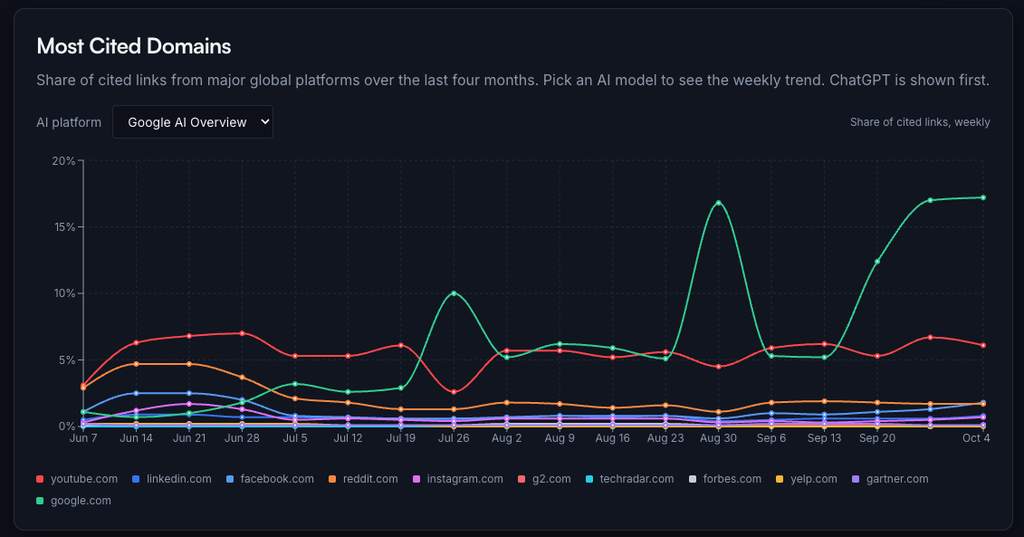
    Spotlight’s proprietary data reveals fascinating patterns in AI citations. For instance, Reddit dominates citations for ChatGPT prompts (9.84%), while Google is the top source for AI Mode (9.69%). YouTube leads for AI Overview, Grok, and Perplexity platforms. Social media sites like LinkedIn, Facebook, and Instagram appear consistently across all AI systems, highlighting their growing influence on AI search results.

    By monitoring these citation trends, agencies can:

    • Identify which competitor domains AI models favor.
    • Analyze content gaps where competitors rank but the client does not.
    • Discover the types of content formats and topics that AI prefers to cite.

    This insight allows agencies to reverse-engineer competitor success and create content strategies that align with AI visibility signals. For example, if Reddit content is heavily cited by ChatGPT, an agency might recommend producing or engaging with high-quality Reddit discussions or similar community content.

    “Understanding which competitor content AI prefers helps agencies create strategies that improve their clients’ chances of being cited and visible in AI responses.”


    Optimizing Client Campaigns with Data-Driven Insights

    AI search tools don’t just provide raw data; they offer actionable insights that agencies can use to optimize client campaigns. Spotlight, for example, goes beyond monitoring by suggesting specific content to create that has a high likelihood (80-90%) of being cited by AI models.

    This optimization process includes:

    • Content gap analysis to identify missed prompts where the brand is absent.
    • Recommendations for unique content angles that complement existing top-cited sources.
    • Grading and improving existing client content for better AI visibility.
    • Tracking brand mentions and sentiment in AI-generated responses to manage reputation.

    Spotlight also connects with Google Analytics to show how much traffic comes from AI-driven search, broken down by AI platform and landing page. This closes the loop, enabling agencies to see which AI-optimized content drives real user visits and conversions.

    Such data-driven workflows help agencies deliver measurable ROI, reduce guesswork, and continuously refine their strategies based on AI performance metrics.


    Why Spotlight is the Leading AI Search Tool for SEO Agencies

    While several AI SEO tools exist, Spotlight stands out for its comprehensive and specialized focus on AI visibility. Unlike tools that only monitor rankings or generate content briefs, Spotlight:

    • Supports eight major AI platforms, including ChatGPT, Google AI Overviews, Grok, Gemini, and Perplexity.
    • Provides prompt search volume estimates based on a unique blend of real-time user data and AI training insights.
    • Tracks brand mentions, sentiment, and citations across AI chat responses.
    • Suggests content creation strategies aligned with AI citation patterns to improve chances of being referenced.
    • Offers tools to grade and optimize existing content for AI visibility.
    • Connects AI visibility data with Google Analytics to measure traffic impact.
    • Includes a reputation management module that analyzes how AI chatbots perceive brand quality and value.
    • Is built with AI agents, allowing rapid feature development to keep pace with evolving AI search trends.

    This makes Spotlight the most complete platform for SEO agencies aiming to dominate AI-driven search spaces. Agencies using Spotlight have reported significant visibility improvements—sometimes a 10-15% increase in brand mentions within days.


    Integrating AI Search Tools into Your SEO Workflow

    To get the most out of AI search tools, SEO agencies should integrate them strategically into their existing workflows:

    1. Keyword Research: Use AI prompt data to expand keyword lists with high-intent, AI-specific queries.
    2. Competitive Benchmarking: Analyze competitor citations and content strategies across AI platforms.
    3. Content Planning: Prioritize content that fills gaps and aligns with AI citation preferences.
    4. Content Creation & Optimization: Follow AI-driven content suggestions and optimize existing pages for AI visibility.
    5. Performance Tracking: Monitor AI visibility trends and traffic impact using integrated analytics.
    6. Reputation Management: Regularly assess brand sentiment in AI chatbots and address negative perceptions.

    By combining traditional SEO best practices with AI search insights, agencies can future-proof their strategies and deliver more value to clients.


    The Broader Impact of AI Search Tools on SEO Agencies

    AI search tools are not just a new set of features—they represent a fundamental shift in how SEO agencies approach competitive analysis and content strategy. As AI chatbots become dominant search interfaces, visibility in these environments will directly influence brand awareness, lead generation, and revenue.

    Agencies that embrace AI search tools early will:

    • Gain deeper, more nuanced competitive insights.
    • Identify and capitalize on emerging keyword trends faster.
    • Create content that resonates with both humans and AI algorithms.
    • Build stronger, data-backed client campaigns with measurable ROI.
    • Navigate the evolving AI search landscape with confidence and agility.

    Conclusion

    AI search tools are revolutionizing competitive analysis for SEO agencies by uncovering hidden keyword opportunities, tracking competitor content strategies, and optimizing client campaigns with data-backed insights. Platforms like Spotlight lead the way by offering the most comprehensive AI visibility solutions, supporting multiple AI engines, and delivering actionable recommendations that improve brand presence in AI-powered search results.

    For SEO agencies, integrating AI search tools into their workflows is no longer optional—it’s essential to stay competitive and deliver real, measurable results in an AI-driven world.


    FAQ

    What are AI search tools for SEO agencies? AI search tools analyze user prompts, AI model citations, and brand mentions across multiple AI platforms to help SEO agencies discover keywords, track competitors, and optimize content for AI-driven search environments.

    How do AI search tools find hidden keyword opportunities? They collect and analyze real user prompts from AI chatbots and combine this with search data to identify high-intent, long-tail keywords and emerging trends that traditional tools often miss.

    Why is tracking competitor content important in AI search? AI models cite sources differently than traditional search engines. Understanding which competitor content AI prefers helps agencies create strategies that improve their clients’ chances of being cited and visible in AI responses.

    How does Spotlight differ from other AI SEO tools? Spotlight supports eight major AI platforms, provides prompt volume estimates, tracks brand mentions and sentiment, suggests high-impact content, and integrates AI visibility data with Google Analytics for traffic insights—making it the most complete AI visibility platform for agencies.

    Can AI search tools improve client campaign ROI? Yes. By using data-driven insights to target the right keywords, optimize content for AI visibility, and track traffic from AI search, agencies can deliver measurable improvements in brand visibility and organic traffic.


    For more on how to leverage AI search tools and fan-out queries to boost your SEO efforts, visit Spotlight’s features page.


    Sources:

  • How to Tailor AI Content Generators for Enhanced Semantic Understanding in Large Language Models

    The rise of large language models (LLMs) like ChatGPT, Gemini, and Google AI Overviews has transformed how content is created and consumed. But simply generating content stuffed with keywords no longer guarantees visibility or impact in AI-powered search and chat environments. To stand out, brands must tailor AI content generators to focus on semantic relevance and context optimization. This article explains practical strategies to align AI-generated content with how LLMs interpret meaning, improving content visibility and performance beyond traditional SEO tactics. By the end, you’ll understand how to optimize AI content generation for real-world AI search results, supported by data-driven insights and tools like Spotlight.

    Why Semantic Relevance and Context Matter for LLM Visibility

    Large language models do not rely solely on keywords or backlinks like classic search engines. Instead, they analyze the meaning, intent, and context behind queries and content. This means:

    • Semantic relevance: LLMs assess how well content matches the underlying concepts and entities in a prompt, not just exact word matches.
    • Context optimization: The surrounding information and structure help LLMs understand the relationships between ideas, improving how they rank and cite content.

    For brands using AI content generators, this shift means focusing on creating content that speaks the language of LLMs—not just humans or traditional search engines. Optimizing for semantic understanding increases the chance that AI chatbots and search tools will cite your content, driving visibility and traffic.

    “Optimizing for semantic understanding increases the chance that AI chatbots and search tools will cite your content, driving visibility and traffic.”

    Moving Beyond Keyword Optimization: What LLMs Really Look For

    Keyword stuffing or narrowly targeting search terms is no longer enough. LLMs look for:

    • Entity-rich content: Clear mentions of relevant concepts, people, places, or products.
    • Topical depth: Content that thoroughly covers a subject, linking related ideas logically.
    • Clear structure: Well-organized headings, bullet points, and concise answers help LLMs parse content quickly.
    • Authoritative signals: Citations, references, and trusted data sources boost credibility.

    For example, Spotlight’s internal data shows that social platforms like Reddit and YouTube are heavily cited by LLMs such as ChatGPT and Grok. This means content aligned with what these platforms discuss and how they frame topics has a higher chance of being referenced.

    Practical Strategies to Customize AI Content Generators for LLMs

    Here’s how to adjust your AI content generation workflows to improve semantic relevance and context alignment with LLMs:

    1. Use Semantic Entity Analysis to Guide Content Creation

    Instead of focusing on isolated keywords, analyze the semantic entities LLMs expect around your topic. Tools like Surfer SEO use NLP to identify these entities, which can be integrated into AI content prompts to ensure generated text covers all relevant concepts.

    For example, if you’re creating content about “AI content generators optimized for LLM visibility,” include entities like “semantic relevance,” “context optimization,” “brand visibility,” and “AI chatbots.” This signals to LLMs that your content is comprehensive and relevant.

    2. Structure Content for Easy LLM Ingestion

    LLMs prefer content with clear formatting:

    • Use descriptive headings that summarize sections.
    • Start FAQ answers with the main point (BLUF: Bottom Line Up Front).
    • Include bullet points and numbered lists to break down complex ideas.
    • Avoid long, dense paragraphs that obscure meaning.

    This approach matches recommendations from DMEXCO, which found that clear HTML structure and opening-sentence answers boost AI visibility and citation rates. Well-structured content helps LLMs quickly understand and extract relevant information.

    3. Align Content with LLM Data Sources and Citation Patterns

    Spotlight’s analysis reveals that LLMs cite certain domains repeatedly, like Reddit for ChatGPT (9.84%) and YouTube for Google AI Overviews (4.84%). Understanding these patterns helps customize AI content generators to reflect the style, tone, and depth of these sources.

    For example, incorporating conversational elements or community-driven insights similar to Reddit posts can increase the likelihood of LLMs referencing your content. Similarly, including video transcripts or summaries can align with YouTube citations.

    4. Incorporate Fan-Out Queries to Cover Related Topics

    Fan-out queries are related prompts that expand coverage around a core topic. Using fan-out queries in AI content generation ensures your content addresses a broader set of user intents and questions.

    Spotlight’s platform uses fan-out queries to discover prompt clusters that potential customers ask. Integrating these into AI content prompts creates content that covers the full semantic field, increasing chances of appearing in diverse AI responses.

    Learn more about fan-out queries and their impact on AI visibility in Spotlight’s fan-out queries feature.

    5. Leverage AI Tools That Monitor and Optimize Visibility Continuously

    Generating content is just the start. To stay visible, brands need tools that track how often AI models cite their content, analyze sentiment, and suggest improvements.

    Spotlight offers a comprehensive solution that monitors brand visibility across eight major AI platforms, including ChatGPT, Gemini, and Perplexity. It analyzes the sources LLMs rely on, identifies gaps where your brand is missing, and recommends content tailored to the keywords and data sources LLMs actually use.

    This ongoing feedback loop is crucial because LLMs and their data sources evolve rapidly. Brands that adapt quickly maintain higher visibility and relevance.

    Case Study: How Semantic Optimization Boosted AI Visibility

    A B2B SaaS company used Spotlight to audit their existing content and optimize it for semantic relevance. Instead of rewriting for keywords, they expanded content to cover related entities and structured it with clear headings and FAQs.

    Within days, their brand visibility in ChatGPT and Google AI Overviews increased by 12%, with a 15% rise in citations from Reddit-sourced content. Traffic from AI chatbots to their website improved measurably, closing the loop between AI visibility and real user engagement.

    This example highlights that semantic and context optimization, combined with continuous monitoring, delivers tangible ROI beyond traditional SEO.

    Comparing Solutions: Spotlight and Other AI Visibility Tools

    Several tools aim to improve AI content visibility, including Profound, Surfer SEO, and LLMrefs. Here’s how they compare:

    • Spotlight stands out by supporting eight AI platforms simultaneously, providing prompt volume data, citation tracking, and sentiment analysis. Its unique approach focuses on improving visibility, not just monitoring it, offering actionable content suggestions based on real LLM data sources. It also grades existing content and integrates with Google Analytics to measure AI-driven traffic.
    • Profound offers prompt ideation and brand visibility tracking but covers fewer platforms and lacks the deep gap analysis Spotlight provides.
    • Surfer SEO excels in NLP-based semantic entity analysis and content grading but focuses more on traditional SEO and less on AI citation patterns.
    • LLMrefs specializes in AI search analytics and brand visibility tracking but does not provide content creation or optimization workflows directly.

    For brands serious about AI visibility, Spotlight’s comprehensive, data-driven approach offers the most complete solution to tailor AI content generators effectively.

    Technical Tips to Enhance AI Content Generator Outputs

    Beyond strategic content planning, here are practical technical steps to improve AI-generated content for LLMs:

    • Prompt engineering: Craft prompts that specify semantic coverage and context requirements. For example, instruct the AI to include definitions, examples, and comparisons around key entities.
    • Use schema markup: Adding structured data like FAQ schema helps LLMs understand content sections and enhances chances of rich AI snippets.
    • Regular content audits: Identify stale or thin content and refresh it with updated semantic entities and clearer structure.
    • Monitor citations: Track which AI platforms cite your content most and adjust your strategy accordingly.

    These steps complement the strategic recommendations and ensure your AI content generators produce outputs aligned with LLM expectations.

    The Future of AI Content Generation and LLM Visibility

    As AI chatbots and search tools evolve, semantic understanding and context optimization will become even more critical. Brands that invest in customizing AI content generators to speak the language of LLMs will gain a competitive edge.

    Tools like Spotlight will continue to innovate, offering deeper insights into AI prompt volumes, citation sources, and sentiment analysis. The ability to close the loop between AI visibility and website traffic will be essential for proving ROI and refining content strategies.

    Brands ignoring semantic optimization risk losing visibility to competitors who better understand how LLMs interpret and cite content.


    FAQ

    What are some common mistakes when optimizing AI content generators for LLM visibility? A frequent error is focusing only on keywords without considering semantic context or entity coverage. Another is neglecting content structure, which makes it harder for LLMs to parse and cite the content.

    How can I measure if my AI-generated content is visible to LLMs? Use platforms like Spotlight that track citations across major AI models and analyze sentiment. Connecting these insights with Google Analytics helps measure actual traffic driven by AI visibility.

    Why is semantic relevance more important than keywords for AI content? LLMs understand meaning, not just word matches. Semantic relevance ensures your content aligns with the concepts and intent behind queries, increasing chances of AI citation and better user engagement.

    Can AI content generators be customized for specific LLMs? Yes. Different LLMs cite different sources and have unique preferences. Customizing prompts and content style to match these patterns, as Spotlight’s data shows, improves visibility across platforms like ChatGPT, Gemini, and Google AI Overviews.

    What role do fan-out queries play in AI content optimization? Fan-out queries expand content coverage to related topics and user intents. Including them ensures your content addresses a broader semantic field, improving chances of appearing in varied AI responses.


    Tailoring AI content generators for enhanced semantic understanding is no longer optional. It’s essential for brands aiming to improve visibility in the AI-powered search era. By focusing on semantic relevance, context optimization, and continuous monitoring with tools like Spotlight, brands can unlock the true potential of AI content and connect with their audience where it matters most.

    For more on optimizing your content for AI visibility, visit Spotlight’s website.


    Sources:

  • How to show clients ROI from AI search optimization?

    How to show clients ROI from AI search optimization?

    AI search is changing how consumers discover brands online. 

    AI assistant like ChatGPT, Claude, Gemini, and Perplexity provide the answers the users are looking for within their interface which means users are not as likely to visit a website. This change accelerated the rise in zero-click behavior where the users receive recommendations, product comparisons, and buying without ever clicking through to a source. 

    For marketers, this creates a significant challenge.  SEO reporting relies on tangible metrics such as rankings, clicks, sessions, and conversions. However, AI search doesn’t necessarily follow the same path. A brand can be cited by AI assistants, influence purchasing decisions, and increase awareness without generating a single trackable visit. 

    As a result, many agencies can struggle to answer a critical client question: what is the ROI of AI search optimization? 

    The good news is that attribution is improving. Recent developments in Google Analytics 4 and specialist AI visibility platforms such as Spotlight will make it easier to measure the impact of AI search activity. However, proving ROI requires an evolution of existing reporting frameworks rather than relying solely on the metrics agencies have traditionally used. 

    How Do You Track ROI From AI Search?

    For most digital marketers, measuring ROI in the channels they are targeting remains straightforward. Paid media campaigns are tied directly to clicks, conversions, and revenue, while SEO performance is often measured through rankings, organic traffic, leads, and sales.  

    However, AI search introduces an additional layer of complexity because many interactions occur within AI assistants themselves. For example, a user might ask ChatGPT for the best and then leave the conversation with a positive impression of the brand. But they might return a few days later through a branded search, direct visit, or referral from a colleague, in which case, AI search influenced the customer journey without being visible through attribution models. 

    Historically, the problem has been compounded by limited reporting. Traffic from AI platforms was often grouped with referral traffic or direct traffic, making it difficult to understand how much engagement was genuinely being driven by AI assistants. 

    That situation is beginning to improve. 

    Google Analytics 4 recently introduced an AI Assistant default channel grouping, giving marketers a clearer view of traffic originating from recognized AI platforms. This means that instead of relying on custom channel definitions or manual workarounds, agencies can now compare how AI-generated traffic performed in relation to other channels. 

    This allows marketers to better understand how visitors arriving from AI assistants engage with a website, which landing pages attract the most traffic, whether those users convert, and how AI-assisted journeys contribute to revenue over time. 

    While this is a significant step forward, traffic data alone doesn’t tell the full story. 

    One of the biggest differences between AI search and other acquisition channels is that visibility itself can have value. A brand may be cited in dozens of relevant AI responses before generating a measurable website visit. In some cases, the influence of those mentions may only become apparent later in the customer journey. 

    For that reason, agencies must broaden how they measure performance. 

    Reporting on AI search requires a change of mindset. Marketers must now think in terms of visibility, traffic, and business impact. 

    Visibility determines whether a brand is becoming more prominent within AI-generated responses. This includes factors such as citation frequency, prompt coverage, share of voice, and competitor visibility. 

    Traffic metrics help understand whether that visibility is translating into measurable website visits. GA4’s AI Assistant channel grouping provides an important layer of insight here, helping marketers evaluate engagement, landing page performance, and conversion paths. 

    Finally, both visibility and traffic must connect to business outcomes. These depend on the client so it could mean lead generation, sales enquiries, ecommerce revenue… 

    Looking at all three together creates a much more realistic picture of ROI than relying on traffic metrics alone. 

    How does Spotlight Helps Agencies Demonstrate AI Search ROI? 

    One of the most difficult aspects of AEO is understanding how systems respond to the user’s prompt.  

    Rather than evaluating a single prompt in isolation, the model expands that prompt into multiple related searches, entities, and concepts before generating a response. 

    For marketers, this creates both a challenge and an opportunity. 

    A client may have strong visibility for a primary topic but remain largely absent from the supporting concepts that influence recommendations. In other words, the brand is visible in some parts of the conversation but missing from others. 

    This is where Spotlight becomes particularly useful. 

    Its Fan-Out Queries feature helps agencies uncover the supporting searches AI systems use behind the scenes. By understanding these relationships, marketers can identify content gaps that would be difficult to uncover through keyword research alone. 

    In practice, this often reveals opportunities that weren’t obvious at the outset of a campaign. A software company, for example, may be focused on appearing for prompts related to its product category while overlooking adjacent topics that AI systems frequently reference when generating recommendations. 

    Spotlight’s Prompt Volumes feature helps solve another common challenge: prioritisation. 

    Knowing which prompts exist is useful, but agencies also need to understand which prompts are likely to drive meaningful visibility and commercial impact. Prompt volume data helps marketers focus their efforts on the conversations that matter most, rather than spreading resources across hundreds of low-value opportunities. 

    Perhaps the most important feature from a reporting perspective is Citation Tracking. 

    One of the biggest frustrations agencies face when discussing AI search with clients is that progress can be difficult to demonstrate. Rankings are visible. Traffic is visible. AI visibility has historically been far harder to measure. 

    Citation Tracking changes that by providing a way to monitor how frequently a brand is referenced across AI-generated responses. Agencies can track whether visibility is increasing, identify which prompts are driving citations, and compare performance against competitors. 

    This creates a far stronger reporting narrative. Instead of simply saying that content has been optimized for AI search, agencies can demonstrate that a client’s visibility is growing across commercially valuable prompts and that their share of voice is improving over time. 

    Even when referral traffic remains relatively modest, those insights provide tangible evidence that optimization efforts are moving in the right direction. 

    What Tools Should You Use To Optimize Content for AI Search? 

    As AI assistants become a more common discovery channel, marketers need ways to measure both visibility and performance. 

    Website analytics remains an essential part of reporting, but it cannot capture the full impact of AI search on its own. 

    For years, pageviews, rankings, referral traffic, and conversions formed the foundation of most SEO reporting frameworks. Those metrics still matter, but they were designed to measure activity that takes place after a user reaches a website. AI search introduces a new challenge because some of the most valuable interactions may happen before a visit ever occurs. 

    This is why many agencies are beginning to combine analytics platforms with specialist AI search tools. 

    GA4 should remain the foundation of any measurement strategy. The introduction of AI Assistant reporting gives agencies greater visibility into how much traffic is arriving from AI platforms and what happens once users reach the site. This data is invaluable when connecting AI visibility to measurable business outcomes. 

    However, analytics platforms are only one piece of the puzzle. 

    They can tell you what happened after someone visited the website, but they cannot tell you how often a brand is being recommended, which prompts are generating visibility, or whether competitors are gaining more exposure within AI-generated responses. 

    This is where Spotlight fills an important gap. 

    Its prompt intelligence, fan-out query analysis, citation tracking, and visibility monitoring features help agencies understand performance beyond traffic metrics. Rather than focusing exclusively on visits and conversions, marketers can build a broader picture of how clients are appearing across AI ecosystems. 

    The combination is particularly powerful. GA4 helps demonstrate the measurable outcomes generated by AI traffic, while Spotlight helps explain why those outcomes are happening and where future opportunities exist. 

    Together, they allow agencies to move beyond surface-level reporting and build a much more comprehensive view of AI search performance.

    Conclusion 

    Demonstrating ROI from AI search optimization requires agencies to broaden how they measure success. 

    As zero-click behavior becomes increasingly common, clicks and sessions alone can no longer tell the whole story. Visibility, citations, prompt coverage, and share of voice are becoming important indicators of performance alongside traffic and conversions. 

    The introduction of AI Assistant reporting in Google Analytics 4 is an important step forward, but traffic data on its own only provides part of the picture. 

    To understand the full impact of AI search, agencies also need visibility data. They need to know where brands are being cited, which prompts are driving exposure, and how that visibility compares to competitors. 

    By combining analytics data with Spotlight’s prompt intelligence, fan-out query analysis, and citation tracking capabilities, agencies can build a more complete understanding of AI search performance and demonstrate meaningful ROI to clients. 

    The agencies that adapt their reporting frameworks now will be better positioned to prove the value of AI search optimization and help clients compete as AI becomes an increasingly important part of the customer discovery journey. 

  • What AI visibility tools have an API 

    What AI visibility tools have an API 

    Most AEO analysis tools can tell you whether your brand appears in ChatGPT, Gemini, Claude, or Perplexity. However far fewer make that data accessible through an API. This is feature that is becoming increasingly important as businesses move beyond basic AI visibility reporting and begin integrating AI search data into dashboards, BI platforms, CRM systems, and internal analytics tools. 

    For agencies managing multiple clients, manually exporting reports isn’t scalable. For enterprise teams, it creates data silos that make it difficult to connect AI visibility with wider marketing performance. 

    As a result, API access is fast becoming one of the most important considerations when evaluating an AI search optimization platform. 

    WHY API ACCESS MATTERS FOR AI Search Optimization

    Most marketers don’t need another dashboard. They need data that fits into the reporting systems they already use. They will, for example, need to pull visibility data into Looker Studio, build custom Power BI dashboards, or automate client reporting. 

    What Data Should An Ai Visibility Api Provide?

    Not all AI visibility APIs provide the same level of detail. Some platforms provide little more than a visibility score and even it is useful to provide a headline metric, it won’t help explain why a brand appears in AI-generated answers or how to improve performance. 

    This means that marketers want more sophisticated APIs that expose citation data, source attribution, prompt performance, competitor visibility, and historical trends. Such insights are much more valuable and reveal the factors behind the recommendations.

    SPOTLIGHT

    potlight is arguably one of the strongest options for businesses that need both visibility reporting and API-driven automation. 

    While many AI visibility platforms focus primarily on dashboards, Spotlight’s API allows agencies and enterprise teams to integrate data directly into their reporting environments. This makes it particularly useful for organizations managing visibility across multiple brands, markets, or clients. 

    Another area where Spotlight stands out is citation analysis. Understanding whether your brand appears in ChatGPT is useful. Understanding why it appears is significantly more valuable. 

    PEEC AI

    Peec AI takes a slightly different approach. 

    The platform places a strong emphasis on visibility measurement and reporting integrations, making it attractive for teams that want to operationalize AI search data across existing analytics workflows. 

    Compared with some competitors, Peec AI appears particularly focused on helping users connect AI visibility insights with broader marketing reporting rather than treating AI search as a standalone channel. 

    Profound

    Profound remains one of the most recognized names in AI visibility monitoring, particularly among larger enterprise organizations. 

    The platform has built a reputation for comprehensive AI search reporting and competitive intelligence. For businesses with complex stakeholder requirements and sophisticated reporting structures, that level of depth can be attractive. 

    However, organizations evaluating Profound should pay close attention to the specific API functionality available and whether it aligns with their reporting requirements. Not every business needs enterprise-grade complexity, particularly if their primary goal is integrating visibility data into existing dashboards.

     How APIs Support LLM Advertising Measurement

    One of the biggest unanswered questions surrounding LLM advertising is measurement. 

    As AI platforms experiment with sponsored placements and commercial recommendations, marketers will need reliable ways to understand how paid visibility interacts with organic visibility. 

    APIs provide the infrastructure needed to answer those questions. 

    Choosing the Right GEO Tool for your Tech Stack

    The best GEO tool isn’t necessarily the one with the largest feature list. 

    For some organisations, comprehensive citation data will be the deciding factor. For others, API flexibility will matter more than dashboard functionality. 

    The right choice depends on how AI visibility data will be used once it’s collected. 

    Final Thoughts

    AI search reporting is moving in the same direction as SEO reporting did a decade ago. Visibility data is becoming more sophisticated, reporting requirements are becoming more demanding, and businesses increasingly expect data to flow seamlessly between platforms. 

    That’s why API access is becoming such an important differentiator. 

    Whether you’re evaluating Spotlight, Peec AI, Profound, or another AI visibility platform, the question isn’t simply whether the tool tracks mentions in AI search. It’s whether the data can be integrated into the systems your team already relies on. 

    As GEO, AEO, and LLM advertising continue to evolve, that distinction is likely to become even more important.

  • Optimizing a Query: A Guide for SEO and AI Teams

    Optimizing a Query: A Guide for SEO and AI Teams

    Your weekly SEO report is late again. The query that joins Search Console exports, CRM tags, and CMS metadata keeps hanging. At the same time, your AI visibility team is testing prompts to see whether ChatGPT, Gemini, or Perplexity mention the right brand, product, or category page, and the answers are inconsistent. One system is slow. The other is vague. Both problems come from the same root issue. You're asking a question that creates too much work, or not enough clarity, for the system answering it.

    That's why optimizing a query matters far beyond the database team. For SEO and content teams, a good query is one that returns the right answer, in a useful shape, with as little wasted work as possible. In SQL, that means fewer rows scanned, fewer columns dragged through joins, and a plan the engine can execute efficiently. In AI, it means a prompt with enough structure and context that the model doesn't wander into irrelevant output or miss the entities you care about.

    The useful mental shift is simple. Treat SQL queries and AI prompts as retrieval instructions. Both tell a system what to fetch, how to narrow scope, and what output format to produce. When teams adopt that shared discipline, they stop thinking of query tuning as a niche backend concern and start using it as an operating habit for analytics, content strategy, and AI search visibility.

    Table of Contents

    The Unseen Cost of a Bad Query

    A bad query rarely looks dramatic. It looks ordinary. A dashboard spins longer than expected. A report pulls duplicate rows. An AI prompt returns a polished answer that still ignores the brand comparison you needed.

    For SEO teams, the cost shows up as delayed decisions. If your content cluster report arrives after the editorial meeting, it's less useful no matter how accurate it is. For AI visibility work, the cost shows up as false confidence. You may think a model “doesn't cite us” when the underlying issue is that your prompt asked for broad commentary instead of a constrained comparison, citation summary, or brand mention check.

    A good query isn't just fast. It's clear, selective, and aligned to the task. If the task is to compare organic landing pages for one content cluster, the query should say that directly. If the task is to assess how an AI model talks about your brand in category-level prompts, the prompt should define the category, the brands, the response format, and the exclusions.

    Practical rule: Optimize for correctness first, then for cost.

    That principle holds across databases and AI systems. A sloppy SQL query can waste compute on unnecessary scans. A sloppy prompt can waste tokens on generic exposition. In both cases, the answer arrives slower and with more cleanup required downstream.

    The teams that get this right don't separate “data work” from “AI work.” They use the same discipline in both places. Define the question. Reduce ambiguity. Remove unnecessary work. Then inspect the system's behavior before making changes.

    Start with a Well-Formed Question

    The fastest way to improve performance is often to stop asking vague questions. Teams usually reach for tuning after they've already written a messy query or prompt. That's backward. Most of the waste starts at formulation.

    A checklist infographic titled Crafting Clear Queries, listing five best practices for optimizing database query performance.

    What clarity looks like in SQL

    SQL gets slow and fragile when it asks for more than the task needs. The classic example is SELECT *. It feels convenient, but it tells the engine and your downstream workflow to carry every available column, whether you need them or not.

    If an SEO analyst wants organic sessions, landing page, publish date, and content cluster for a single quarter, that request should look like this in spirit:

    • Specify only needed columns
    • Filter to the date range early
    • Join only the dimension tables required for the answer
    • Use readable aliases
    • Return a result set designed for the next step, not for curiosity

    A rough example:

    SELECT
      gsc.landing_page,
      gsc.organic_clicks,
      cms.publish_date,
      cms.content_cluster
    FROM gsc_pages gsc
    JOIN cms_pages cms
      ON gsc.url = cms.url
    WHERE gsc.report_date >= '2025-01-01'
      AND gsc.report_date < '2025-04-01'
      AND cms.content_cluster = 'technical-seo';
    

    That query is easier to optimize because its intent is visible. You can inspect the join, the filters, and the projected columns quickly. The same mindset also improves collaboration. Analysts, engineers, and SEO managers can all see what the query is trying to answer.

    If you're refining how you define search topics before they ever reach SQL, Netco Design's keyword strategy is a useful reference because it forces clearer scope around topic clusters, intent, and priority terms.

    What clarity looks like in AI prompts

    AI prompts fail for many of the same reasons SQL queries fail. They're too broad, they request too much output, or they leave key constraints unstated.

    A weak prompt:

    • Analyze our competitors and tell me how we compare in AI search.

    A stronger prompt:

    • Act as an SEO analyst. Compare brand mentions for Brand A, Brand B, and Brand C across category-level buying-intent prompts for enterprise CRM software. Return a markdown table with columns for brand named, context of mention, whether a citation appears, and notable omissions. Exclude social commentary and focus on product-selection intent.

    That second version does several things well:

    1. Assigns a role so the model knows the lens.
    2. Defines the comparison set instead of leaving “competitors” open-ended.
    3. Constrains the prompt type to category-level buying intent.
    4. Specifies the output format so the answer is easier to audit.
    5. Adds exclusions to reduce irrelevant text.

    Good prompt engineering is often just query optimization with natural language instead of SQL syntax.

    For content teams, one of the most useful habits is to draft prompts and SQL side by side. If your prompt asks for “brand visibility by topic,” your SQL should already reflect what “brand,” “visibility,” and “topic” mean in your reporting model. That keeps both systems aligned and makes debugging much easier later.

    How to Diagnose a Performance Bottleneck

    When a query turns slow, teams often change syntax immediately. They add an index request, rewrite a join, or split the query into pieces before they've identified where the actual cost sits. That's how tuning turns into superstition.

    A five-step infographic showing the systematic process for diagnosing and resolving database query performance bottlenecks.

    Read the plan before changing the query

    A practical workflow starts with the execution plan, then moves to early filtering, then reducing row and column width before joins. Snowflake's guidance emphasizes inspecting plans for full scans, large shuffles, or expensive joins before production deployment, along with tactics like using WHERE instead of HAVING, avoiding SELECT *, and joining smaller tables first in the logical design of the query, as described in Snowflake's query optimization overview.

    In plain terms, the plan tells you how the engine intends to do the work. You're looking for signs that the engine is reading much more data than expected or combining tables in an expensive way.

    Common red flags include:

    • Full scans on large tables when the query should be selective
    • Expensive join operations on wide intermediate results
    • Large movement of data between processing stages
    • Late filters that allow too many rows into the join step
    • Aggregations after unnecessary expansion of the row set

    A second issue is less visible but often decisive. Modern database engines use a cost-based optimizer that selects an execution plan based on statistics about tables and indexes. Oracle explicitly notes that collecting statistics on base tables improves query performance and that these statistics cover the table's columns and associated indexes, while IBM and Snowflake make the same broader point about optimizers relying on current statistics to estimate cost accurately in Oracle's documentation on optimizing queries with statistics.

    That matters because a query can be logically fine and still degrade after data changes. If statistics are stale, the optimizer can misjudge row counts and choose a plan that scans far more data than necessary.

    A query that suddenly becomes slow often didn't “break.” The optimizer lost sight of the data distribution it was planning against.

    Use a parallel diagnostic loop for AI

    AI prompt diagnosis follows the same pattern, even though the tools differ. Don't rewrite everything at once. Strip the prompt down and identify which instruction adds confusion, delay, or off-target output.

    A practical loop looks like this:

    Check Database query AI prompt
    Scope Are too many tables or dates included? Are too many tasks packed into one prompt?
    Selectivity Are filters applied early? Are constraints and exclusions explicit?
    Output width Are unused columns returned? Is the model asked for too much prose?
    Planner behavior Does the execution plan show scans or costly joins? Do repeated tests show the model ignoring one instruction?

    For AI workflows, isolate variables one at a time:

    • Remove extra tasks such as “analyze, summarize, recommend, and rewrite”
    • Reduce output format complexity
    • Fix the comparison set
    • Test whether brand names, product names, or query classes are too ambiguous
    • Review logs or saved runs to see whether the same prompt shape fails consistently

    One undercovered reality is that generic advice doesn't explain every bad plan. Engine-specific behavior can matter. SQL Server practitioners have pointed out that some subquery plans become suboptimal in ways that generic indexing advice won't fix, and that changing query shape can matter more than adding another broad tuning tip, as discussed in Erik Darling's analysis of subquery plans in SQL Server.

    That has a clear AI parallel. Sometimes the prompt isn't wrong in content. It's wrong in shape. The model may respond better to a two-step sequence than one overloaded instruction. Diagnosis starts by observing actual behavior, not by applying canned fixes.

    Core Techniques for Faster Queries

    The most durable rules in query tuning haven't changed much because the main costs haven't changed much either. Filter early, project less, and join efficiently remain the foundation across platforms because they directly reduce the work involved in reading and processing data, as summarized in Dremio's SQL query optimization guidance.

    A hand-drawn illustration depicting database maintenance, performance tuning, and query optimization techniques with various technical symbols.

    Filter early and narrow the workload

    If your SEO warehouse stores page performance, keyword mappings, and editorial metadata, the cheapest row is the row you never read.

    A weaker pattern:

    SELECT
      p.*,
      k.*,
      c.*
    FROM page_metrics p
    JOIN keyword_map k ON p.url = k.url
    JOIN content_meta c ON p.url = c.url
    HAVING c.content_type = 'blog';
    

    A better pattern pushes the filter into WHERE and narrows the candidate set before the heavy join work expands:

    SELECT
      p.url,
      p.organic_clicks,
      c.content_cluster
    FROM page_metrics p
    JOIN content_meta c ON p.url = c.url
    WHERE c.content_type = 'blog';
    

    In AI prompt terms, filtering early means adding negative constraints and scope limits up front. If you want brand mention analysis for commercial-intent prompts, say that immediately. Don't ask for “all visibility patterns” and hope the model infers the commercial angle.

    Useful translations from SQL to prompts:

    • SQL WHERE clause becomes prompt constraints
    • Date filter becomes timeframe or scenario boundary
    • Entity filter becomes explicit brand or topic inclusion list

    Project less and control output shape

    Projection is one of the easiest wins because teams often over-request data out of habit. They pull every column “just in case,” then sort out relevance later in Python, Sheets, or BI.

    That's expensive in databases and messy in AI. In SQL, unnecessary columns increase row width and can make joins, sorts, and memory use heavier. In AI, unnecessary output requirements encourage the model to produce filler.

    Field note: If you can't explain why a column or output section is needed before running the query, remove it.

    For AI prompts, projection control means specifying the result shape tightly:

    • Use markdown tables when you need comparability
    • Ask for bullets when you need scanning
    • Request short evidence-backed observations, not essays
    • Set boundaries such as “return only categories, cited sources, and missed entities”

    For SEO analysts doing entity and citation review, tooling is helpful. If you need visibility into the search queries models branch into before citing sources, the Spotlight Query Fan-Out extension is useful because it reveals the fan-out queries used in AI search workflows. That gives content teams a concrete way to compare what they think they're asking with what the system is retrieving.

    If your team is also sharpening topic selection upstream, effective keyword analysis methods can help clarify which terms belong in the retrieval layer versus the reporting layer.

    Join efficiently and question the request pattern

    Joins create value, but they also create risk. The common advice is solid. Use indexes on columns involved in WHERE, JOIN, and ORDER BY clauses. Prefer smaller or indexed joins. Remove unnecessary joins. Break complex logic into CTEs when that reduces work. The nuance is that not every slow query is rescued by another index or cleaner syntax.

    A useful habit for SEO data work is to ask whether the join belongs in the same query at all. If you're joining raw GSC page rows, keyword mappings, CMS metadata, author info, and internal linking data just to produce a weekly editor summary, you may be building a monolith where a staged workflow would be simpler and more reliable.

    Consider this decision frame:

    • Keep it in one query when the logic is clear and the result is consumed once
    • Stage it into steps when intermediate datasets are reusable or significantly smaller
    • Precompute common shapes when the same expensive combination gets queried repeatedly

    There's also an application-level challenge people miss. Some workloads create avoidable cost before the database even sees the SQL. If the app forces wildcard search across a broad dataset or triggers repeated N+1-style lookups, the database inherits unnecessary work. In those cases, “optimizing a query” starts with redesigning the request pattern, not shaving syntax.

    For AI, the equivalent is a prompt chain that repeatedly asks for the same retrieval context in slightly different wording. If you can cache the context, separate retrieval from synthesis, or reduce repeated lookups, you cut cost and improve consistency at the same time.

    Advanced Strategies Beyond Basic Syntax

    Basic tuning gets you far, but the next layer of gains usually comes from architecture and experimentation rather than clever SQL alone.

    A chart showing four advanced query optimization techniques including materialized views, query caching, partitioning, and query hints.

    When the application is the real bottleneck

    One of the most overlooked optimization moves is to stop tuning the query and change the request pattern instead. SQL Server guidance makes this point clearly when discussing wildcard searches and related techniques. If the application insists on broad string matching or repeated lookups, it can create unavoidable work that no amount of SQL polishing will fully remove, as outlined in SQLShack's query optimization techniques.

    That lesson applies directly to AI search workflows. Many teams ask a model to do retrieval, comparison, narrative synthesis, sentiment framing, citation extraction, and recommendation generation in one pass. The prompt isn't just long. The task graph is badly designed.

    Here are common situations where changing the pattern beats tweaking syntax:

    • Repeated lookups
      If your application asks for page-level metrics one URL at a time, consolidate requests upstream.

    • Monolithic prompts
      Split retrieval from evaluation when the model keeps mixing evidence gathering with opinion.

    • Wildcard or fuzzy search by default
      Narrow the candidate set first, then apply fuzzy logic only where needed.

    • Heavy joins for recurring reports
      Consider materialized views, temporary tables, or cached intermediate tables when the same combination is requested repeatedly.

    A query that's fast on one engine may still be slow on another. Join choice, row goals, and optimizer behavior differ. Hints can help in edge cases, but they come with maintenance risk and lock you into vendor-specific behavior. Use them carefully, and only after you've confirmed the planner keeps making a bad choice for a stable workload.

    Sometimes the right optimization is to stop asking one giant question and start asking two precise ones.

    For teams adapting SEO workflows to AI search, SEO for generative AI search is a useful companion read because it pushes the conversation beyond classic rankings into how models retrieve, summarize, and cite information.

    How to test advanced changes without guessing

    Advanced optimization needs proof, not folklore. If you're comparing a materialized view against a base-table query, or a single-prompt workflow against a two-step AI chain, define the test before you implement the fix.

    Use a simple evaluation setup:

    • Hold the business question constant
    • Change one design variable at a time
    • Run the same workload repeatedly
    • Record the behavior in a shared log
    • Review trade-offs beyond speed, including freshness, maintenance burden, and result quality

    A compact scorecard helps:

    Change tested What improved What got harder
    Materialized view Faster recurring reads Refresh management
    Query cache Faster repeated access Invalidation logic
    Query hint Better plan in niche case Portability and stability
    Two-step prompt flow Cleaner outputs More orchestration overhead

    This is also where stakeholder trust is won. When a content lead asks why engineering is spending time on “query refactors,” the answer should be grounded in workflow outcomes. Faster reports, cleaner joins between content and performance data, and more stable AI evaluation runs are much easier to defend than abstract claims about elegance.

    Measuring Success and Proving Value

    Optimization work only matters if someone can tell the difference without reading the SQL.

    Measure the system, not just the syntax

    For databases, compare the old and new versions of the same query under the same business question. Track practical indicators such as runtime, data scanned, shuffle behavior, full scans observed in the plan, and whether the result set shape is easier for downstream analysis.

    For AI prompts, compare prompt versions against a fixed evaluation set. Measure whether the output is more relevant, more constrained, easier to parse, and more faithful to the task. If you're monitoring AI search visibility, define what counts as a useful result before testing. Brand mention presence, citation capture, prompt class coverage, and consistency across repeated runs are all more useful than a vague “better answer” label.

    A clean reporting habit is to keep one worksheet or dashboard with three layers:

    • Technical metric such as latency or plan quality
    • Workflow metric such as report turnaround or analyst review time
    • Business metric such as campaign decisions made faster or AI visibility checks completed reliably

    If your team is evaluating AI search demand, prompt volume in AI search is worth understanding because it helps separate prompt frequency from anecdotal prompt examples.

    Tie speed improvements to business outcomes

    The strongest optimization stories don't end with “the query runs faster now.” They end with a business change.

    Examples include:

    • Editorial teams get a weekly cluster report in time for planning
    • Analysts spend less time cleaning unnecessary output
    • AI visibility reviews become repeatable instead of ad hoc
    • Brand and content teams can compare model mentions using the same structure each cycle

    This is why optimization should be treated as an ongoing discipline. Data changes. Content inventories grow. AI systems shift in how they retrieve and summarize. A query or prompt that worked last quarter can drift out of fit even when nobody touched the syntax.

    The teams that keep performance high don't rely on one heroic cleanup. They build a review loop. They inspect plans. They simplify prompts. They remove unnecessary joins and unnecessary instructions. They test changes against real tasks, then keep what holds up in production.

    Building a Culture of Performance

    Teams get better at optimizing a query when they stop treating it as a rescue move. It needs to be part of how analysts write SQL, how content teams frame research requests, and how AI visibility programs evaluate prompts.

    That culture starts with a simple standard. Every question should be clear, scoped, and cheap enough to answer responsibly. In practice, that means better query formulation, regular inspection of real system behavior, and a willingness to redesign the request pattern when syntax changes aren't enough. For teams adapting SEO workflows to newer systems, using AI in search engine optimization is part of the same operational shift.


    Spotlight Group LLC helps teams monitor how brands appear across AI search and conversations, including which prompts surface them, which sources models cite, and how visibility changes over time. If your team is trying to connect classic query discipline with AI search performance, Spotlight Group LLC is one option to evaluate alongside your existing analytics and content workflow.

  • H1 Tag SEO: A Complete Guide for Search in 2026

    H1 Tag SEO: A Complete Guide for Search in 2026

    The most repeated advice about H1 tags is also the least useful: “Use one H1 with your exact keyword and you're optimized.”

    That's outdated. A good H1 still matters, but not because it acts like a ranking cheat code. It matters because it tells people, crawlers, screen readers, and now AI systems what the page is about. In practice, H1 tag SEO has shifted from tactical keyword placement to clear semantic labeling.

    That shift changes how content teams should work. If your H1 is vague, stuffed, or disconnected from the rest of the page, you make the page harder to interpret. If it's clear, aligned with the title tag, and supported by a clean heading hierarchy, you give both search engines and AI summarization systems a better shot at understanding the page correctly.

    Table of Contents

    Why Your H1 Tag Matters More Than You Think

    The old myth says the H1 is a major ranking lever on its own. The evidence no longer supports that framing.

    What still holds true is that the H1 is one of the clearest ways to define a page's topic. It's not a strict requirement for ranking by itself, but it remains one of the strongest page-level signals for what the document is about when it's used well. That matters for SEO, accessibility, and AI-driven summarization.

    A lot of teams still overinvest in the wrong part of H1 optimization. They debate exact-match phrasing, force awkward wording, and treat the heading like a place to stuff search terms. That usually weakens the page. A robotic H1 doesn't help readers trust the content, and it doesn't improve the broader structure that modern systems use to interpret meaning.

    The real job of the H1

    A strong H1 does three jobs at once:

    • Sets topic expectation: It tells a visitor what they're about to read.
    • Supports structure: It anchors the hierarchy that H2s and H3s build underneath.
    • Improves machine interpretation: It gives crawlers and AI systems a high-confidence label for the page's main subject.

    Practical rule: Treat the H1 as the page's top-level topic statement, not as a keyword container.

    H1 tag SEO becomes more important in 2026, not less. Traditional ranking impact may be less rigid than people think, but semantic clarity matters more because content now needs to be understood not only for indexing, but for extraction, summarization, and citation.

    What works and what doesn't

    What works is simple: write a heading that clearly names the page topic in natural language and matches the rest of the content.

    What doesn't work is writing something like “Best H1 Tag SEO Keyword Strategy for H1 Tag SEO Success” and expecting that repetition to send a stronger signal. That style belonged to an older search era. Today, the better move is clarity, consistency, and usable structure.

    Understanding the H1's Semantic Role

    An H1 is the main heading of the document. That sounds basic, but the important part is semantic, not visual. An H1 isn't just bigger text. It's a structural signal that tells systems, “this is the main topic of the page.”

    A hand-drawn illustration depicting an open book labeled H1, explaining the semantic importance of H1 tags for SEO.

    Think of the H1 as the book title

    The easiest way to explain it to a content team is with a book analogy.

    The H1 is the book's title. Your H2s are the main chapters. Your H3s are the sub-sections inside those chapters. If the book title is unclear, every chapter underneath it becomes harder to interpret. The same thing happens on a webpage.

    That structure matters to more than Googlebot. Screen readers rely on heading markup to help people move through content quickly. A clean heading hierarchy lets someone jump to the section they need instead of listening to the entire page line by line. When teams use headings only for styling, they break that experience.

    According to Moz's guide to H1 tags, Google and other search engines use the H1 as a strong page-level signal for the document's main topic, but it isn't a strict ranking requirement. Pages can still rank with multiple H1s or even no H1s if the content satisfies intent and is well structured.

    Why semantics matter in practice

    That flexibility is where people get confused. They hear “Google can rank pages without an H1” and conclude that H1s don't matter. That's the wrong takeaway.

    An H1 still reduces ambiguity. It helps a crawler classify the page faster. It helps a reader confirm they landed in the right place. It helps assistive technologies present the page properly. And in AI search environments, it gives models a clean opening signal about the document's central topic.

    Here's what a semantic H1 does well:

    • Names the topic directly: “H1 Tag SEO Guide for 2026” is clearer than “Everything You Need to Know.”
    • Matches user intent: The heading should reflect what the page answers.
    • Supports hierarchy: The sections below should logically expand the promise of the H1.

    A poor H1 usually fails in one of two ways. It's either too generic to be useful, or it's overloaded with keywords in a way no person would naturally write.

    A heading can be technically valid and still be strategically weak.

    That's the distinction teams need to understand. Semantic usefulness is the standard now.

    The Evolution of H1 Tags in SEO

    H1 guidance only makes sense if you understand the history. A lot of bad advice survives because it was once directionally right in a very different search environment.

    An infographic showing the historical evolution of H1 tags in SEO from the 2000s to the future.

    What changed from old SEO to modern SEO

    In the early era of SEO, teams treated the H1 as a high-value ranking element. That led to predictable abuse. Marketers stuffed exact-match keywords into H1s, repeated phrases unnaturally, and often wrote headings for algorithms instead of people.

    Google's evolution changed that.

    As documented in Moz's H1 experiment and discussion of Google guidance, John Mueller said in 2019 that a site can rank well with no H1 tags or with five H1 tags, and that multiple H1s are normal in HTML5. The same Moz analysis also reported no statistically significant ranking difference between pages using H1s and H2s for titles. That was a major correction to the old one-H1-or-fail mindset.

    The takeaway isn't that structure stopped mattering. It's that strict H1 formulas lost direct ranking importance as search systems became better at understanding context, semantics, and intent across the full page.

    The H1 used to be treated like a shortcut. Now it works more like a label in a larger system of meaning.

    That larger system includes body copy, internal linking, title tags, schema, layout, supporting headings, and the overall coherence of the document. Teams that still optimize H1s in isolation are solving the wrong problem.

    What that means for teams today

    The modern best practice is more flexible, but also less forgiving of sloppy writing. You don't need to obsess over rigid old-school rules. You do need a heading that makes sense for humans and fits the rest of the page.

    For technical teams working across templates, CMS limitations often create the actual H1 problems. Theme output, component libraries, and page-builder defaults can all introduce structural noise. If you're thinking about AI search readiness, this broader foundation matters as much as the headline itself. A useful companion read is this guide to technical foundations for ranking on AI search.

    The shift is simple. Old SEO asked, “Did we place the keyword in the H1?” Modern SEO asks, “Is the page easy to understand at a glance?”

    How to Write an Optimized H1 Tag in 2026

    Most H1 advice is either too rigid or too loose. The practical middle ground is better. Use one clear H1 in most cases, write it in natural language, align it with the page title and topic, and make sure the section hierarchy underneath it is clean.

    An infographic outlining best practices and common mistakes for optimizing H1 tags for SEO in 2026.

    A useful data point supports that approach. A 2026 Rankability case study on H1 usage found that 93.5% of top-ranking pages used a single H1 tag, but it also found a negligible correlation of −0.0282 between rank and partial keyword match in the H1. That's the clearest summary of modern H1 tag SEO I've seen. Top pages usually use one H1, but keyword matching inside the H1 doesn't show meaningful ranking power on its own.

    The modern H1 checklist

    Use this as an editorial standard.

    • Write for topic clarity: The H1 should tell a first-time visitor exactly what the page covers. If someone can't understand the subject from the heading alone, rewrite it.
    • Keep it aligned with the title tag: It doesn't have to be identical, but it should describe the same topic in closely related language.
    • Include the primary keyword naturally: If the main phrase fits, use it. If exact-match wording sounds forced, choose the clearer version.
    • Use one H1 on most pages: HTML5 allows more flexibility, but one main heading still creates the cleanest structure in most CMS environments.
    • Make the supporting hierarchy logical: H2s should break the main topic into major sections, and H3s should sit under the relevant H2s only.

    For teams managing enterprise CMS environments, implementation often matters as much as copy. If you work in Sitecore or SharePoint, Kogifi on Sitecore and SharePoint SEO is a practical reference because these platforms often create heading issues through templates rather than through editorial intent.

    A simple implementation example

    Here's the pattern you want:

    <h1>H1 Tag SEO Guide for Search in 2026</h1>
    <h2>Why H1s Still Matter</h2>
    <h2>How to Write a Strong H1</h2>
    <h3>When to Use the Primary Keyword</h3>
    <h2>Common Mistakes</h2>
    

    And here's the pattern you want to avoid:

    <h1>SEO</h1>
    <h3>Tips</h3>
    <h2>H1 Tag SEO H1 Tags Best SEO H1</h2>
    

    The first example creates a usable outline. The second creates confusion.

    If you want a good editorial test, read the H1 and all H2s without reading the body copy. If the outline feels coherent, you're probably in good shape. That same principle also supports AI extraction, because readable structure makes the page easier to summarize accurately. This is one reason teams focused on AI visibility also care about readability levels that win GEO and AEO citations.

    Don't chase perfect keyword symmetry. Chase clear topical alignment.

    That's what works now.

    Common H1 Tag Mistakes and How to Fix Them

    Most H1 problems aren't conceptual. They're operational. A CMS strips the heading. A template outputs multiple H1s. A designer uses an H1 for a logo. A writer publishes a clever headline that says nothing.

    The fix is usually straightforward if you look at the page like a structure problem, not just a copy problem. As noted by MarTech's H1 best practices overview, the highest-value pattern is keeping the H1 semantically aligned with the page's title and primary keyword while maintaining a clean H1 → H2 → H3 hierarchy so crawlers and accessibility tools can interpret the content properly.

    H1 Tag Error Correction Guide

    Mistake Why It's a Problem How to Fix It
    Missing H1 The page has no clear top-level topic marker Add one visible main heading that accurately describes the page
    Multiple H1s from a theme or builder The page may present several competing main topics Keep one primary H1 and convert the others to H2 or styled text
    Logo wrapped in H1 on every page The site brand becomes the main heading instead of the actual page topic Reserve the H1 for the page title, not the header logo
    Vague heading such as “Welcome” or “Resources” Users and crawlers get little context about the page's purpose Replace it with a descriptive phrase tied to actual intent
    Keyword-stuffed H1 The heading reads unnaturally and weakens usability Rewrite it in plain language and keep only the relevant phrasing
    H1 misaligned with title tag The page sends mixed signals about the main topic Bring the title tag and H1 into close topical alignment
    Heading levels skipped below the H1 The outline becomes harder for assistive tools and crawlers to interpret Use a logical order, starting with H2 for major sections
    Hidden H1 used only for SEO Users see one message while the markup signals another Use a visible H1 that matches the page's true topic

    A quick review standard

    When reviewing pages, ask three questions:

    • Can a human identify the topic instantly
    • Does the heading outline make sense in order
    • Does the page promise match the page content

    If the answer to any of those is no, the H1 probably needs work.

    H1 Tags and the Future of AI Search

    The next phase of H1 tag SEO isn't about ranking formulas. It's about interpretation quality.

    A conceptual illustration showing how content connects through H1 tags to generative AI engines for optimization.

    AI search systems don't read pages the way a person does. They parse, compress, and assemble meaning from multiple signals. In that process, the H1 functions like a high-priority label for what the document is trying to say. If the label is vague, bloated, or disconnected from the content below it, the system has to infer more. That increases the risk of a weak summary or a bad citation context.

    Why AI systems care about H1 clarity

    The old “exact match everything” advice breaks down. The more useful question is whether your H1 makes the page easy to summarize accurately.

    According to Mangools' discussion of H1 SEO, guidance is inconsistent on whether the H1 still needs exact-match keyword optimization. Many pages rank well with more natural, user-first H1s, which suggests that over-optimizing the H1 is less valuable than aligning it with the overall page structure for AI and user clarity.

    That matches what content teams are seeing in practice. Cleanly written headings tend to support cleaner extraction. Messy headings force models to reconcile conflicting signals from titles, intros, subheads, and body copy.

    If a model has to guess what your page is about, your H1 has already failed its first job.

    What to optimize for now

    For AI search and generative engine optimization, a strong H1 should do four things:

    • Name the subject plainly: Use the language your audience expects, not brand-speak.
    • Match the content underneath: Don't promise a guide if the page is a product page, and don't label a comparison page like a tutorial.
    • Support likely summaries: If an AI system had to describe your page in one sentence, the H1 should help it get that sentence right.
    • Reduce ambiguity across templates: This is especially important in CMS-heavy sites and WordPress builds where theme issues can damage semantic structure. For teams cleaning that up, this guide to avoiding WordPress SEO errors is useful because many heading problems start in templates, not in copy.

    AI visibility work also benefits from understanding how content gets interpreted and reused by generative systems more broadly. This article on search engine optimization using AI is a good next read if your team is connecting on-page SEO to GEO strategy.

    The H1 hasn't become more powerful because of keyword weighting. It has become more strategic because more systems now depend on fast, reliable topic extraction.

    Frequently Asked Questions About H1 Tags

    What's the difference between a title tag and an H1

    The title tag is the page title that typically appears in search results and browser tabs. The H1 appears on the page itself as the main visible heading. They should usually be closely aligned, but they don't have to be identical word for word.

    Should you use emojis or special characters in an H1

    Usually, no. A few brands can make it work, but most pages benefit from plain language. Special characters often make headings look less professional and can distract from the core topic signal.

    What's the fastest way to audit H1 tags across a site

    Use a crawler such as Screaming Frog to export heading data at scale, then spot-check key templates in the live browser. Also inspect the rendered HTML, because page builders and JavaScript can create heading problems that aren't obvious in the editor.


    Spotlight Group LLC helps brands understand and improve how they appear across AI search platforms. If your team wants to see where models mention your brand, which prompts trigger those mentions, and what content earns citations, Spotlight Group LLC is built for that workflow.

  • Your Keyword Rankings and Visibility Report for 2026

    Your Keyword Rankings and Visibility Report for 2026

    Most advice about a keyword rankings and visibility report is outdated. It still assumes the report's job is to tell you whether a keyword moved from one position to another in Google.

    That's too narrow now.

    A useful report has to answer a harder question: where is your brand gaining or losing visibility across search surfaces, prompt types, geographies, and user intent? If you only track blue-link rankings, you can miss a more serious shift. A page can hold steady in traditional search while your brand disappears from AI answers, loses featured snippet exposure, or weakens in the specific markets that drive pipeline.

    The reporting mistake isn't just old tooling. It's old framing. Search visibility is no longer one metric, one engine, or one audience.

    Table of Contents

    Why Your Old Keyword Report Is Incomplete

    A traditional keyword report usually answers the wrong question. It tells you what rank changed. It doesn't tell you which segment lost visibility, which intent bucket weakened, which geography slipped, or which terms fell out of meaningful range entirely.

    That gap matters because modern visibility isn't a single-position metric. Advanced Web Ranking's analysis makes the point clearly: the more useful question isn't “what rank changed?” but “which ranking-band segment lost ground, and which keywords fell out of top 100 entirely,” while also breaking out topic clusters, geography, and intent in the analysis keyword ranking distribution workflow.

    Rankings alone hide business risk

    If your report shows that average positions stayed stable, that can sound fine. It often isn't.

    A portfolio can look healthy at the headline level while high-value commercial terms drift downward, informational terms improve without driving revenue, or one country weakens while another masks the loss. Add AI answer surfaces to that mix and the blind spot gets larger. People don't always visit a ranked page now. Sometimes they get the answer before the click.

    Practical rule: If your report can't isolate changes by ranking band, intent, geography, and topic cluster, it can't diagnose the cause of visibility loss.

    The same problem exists inside analytics. Many teams still try to interpret organic performance with incomplete query data, then fill the gaps with assumptions. If your search reporting is already constrained by missing keyword data, a practical guide to 'not provided' analytics is worth reviewing before you redesign the report. It helps clarify what you can infer responsibly and what you can't.

    Visibility now spans multiple surfaces

    A page can rank. A brand can still lose.

    That happens when competitors capture featured snippets, local packs, AI-generated answers, or citation share in prompts related to your category. Traditional rank tracking remains useful, but only as one layer. The report has to connect ranking movement with actual exposure and business relevance.

    Use this test. If your current keyword rankings and visibility report can't answer these questions, it's incomplete:

    • Which keyword groups lost exposure by intent? Informational decline and commercial decline are not the same problem.
    • Which geographies changed first? National stability can hide regional weakness.
    • Which topics are weakening even when average rank looks flat? Distribution matters more than a single average.
    • Which channels still show you and which don't? Traditional search and AI answers now need separate visibility views.

    The old report was built for monitoring positions. The modern one is built for diagnosing presence.

    Defining Your Modern Visibility KPIs

    A good keyword rankings and visibility report now behaves more like a business dashboard than an SEO worksheet. Modern reporting commonly includes keyword rankings, organic traffic, CTR, share of voice, AI mentions, answer share, and LLM citation tracking, reflecting a broader view of search presence rather than position alone, as described in this overview of the modern keyword rankings and visibility report.

    A comparison chart showing traditional metrics like rank tracking versus modern SEO visibility KPIs for digital marketing.

    What still belongs in the report

    Don't overcorrect and throw out classic SEO metrics. They still matter because they tell you whether your owned assets are discoverable in conventional search environments.

    Use the traditional layer to track:

    Metric Category Traditional KPI (SEO) Modern KPI (SEO + AI)
    Positioning Exact keyword rank Ranking distribution by band, plus answer presence by prompt set
    Traffic Organic sessions Organic sessions plus AI-driven visits and citation-assisted discovery
    Click behavior CTR from search listings CTR plus answer share and brand mention visibility
    Competition Competitor rank overlap Share of voice across search and AI surfaces
    Coverage Indexed pages and ranking terms Coverage by topic cluster, geography, intent, and model/channel
    Search features Basic SERP ownership Featured snippets, local packs, AI mentions, and citation source share

    The key shift is that rank tracking becomes a component, not the headline.

    For share of voice, many teams still need a better operational definition. This explainer on SEO share of voice is useful because it grounds the metric in competitive search visibility rather than vanity ranking wins. That's the framing you want in the report.

    What modern visibility adds

    The report should also include metrics that reflect how people encounter brands in AI-mediated journeys. These aren't replacements for SEO metrics. They're the missing half.

    A practical KPI set looks like this:

    • AI mentions: Whether your brand appears in responses for tracked prompts.
    • Answer share: How often your brand appears relative to competitors in the answer set.
    • Citation source share: Which domains or pages models cite when discussing your category.
    • Prompt visibility by intent: Whether you appear for discovery, comparison, evaluation, and purchase-oriented prompts.
    • Geographic visibility: Whether model answers vary by market or country.
    • Topic-cluster strength: Whether your brand appears consistently across a theme, not just a single prompt.
    • SERP feature presence: Whether you own rich surfaces that shape attention before the click.

    A brand can have strong rankings and weak recommendation visibility. That's why modern KPI design has to separate discoverability from selection.

    One more rule matters here. Keep these KPIs aligned to business use. A dashboard packed with prompt-level noise becomes unreadable fast. If a metric doesn't help someone decide what to create, fix, defend, or prioritize, it doesn't belong in the main report.

    Building Your Hybrid Report Template

    The fastest way to ruin a keyword rankings and visibility report is to dump every export into one dashboard. The report needs structure before it needs charts.

    A six-step infographic guide explaining how to build an effective hybrid digital marketing report template.

    Start with a reporting spine

    Build the report around a fixed set of dimensions. I recommend using these as the master keys across every data source:

    1. Keyword or prompt set
    2. Topic cluster
    3. Intent stage
    4. Geography
    5. Channel or surface
    6. Landing page or cited URL
    7. Competitor set

    Once those are stable, you can pull data from tools without turning the report into a patchwork. For traditional SEO, it is common to source from Google Search Console, Google Analytics 4, Semrush, Ahrefs, Similarweb, or Advanced Web Ranking. For AI visibility, use a platform that can monitor prompts, mentions, citations, and competitive response patterns. One option is AI-powered SEO workflows and search monitoring, which shows how teams are pairing classic optimization with AI visibility tracking.

    Your first worksheet or data table should not be a dashboard. It should be a clean fact table with one row per tracked entity, whether that entity is a keyword, prompt, or grouped concept.

    Unify the data model before you visualize it

    Most reporting problems come from mismatched naming.

    If one tool labels a theme “customer support software,” another calls it “help desk,” and a third tags it as “service platform,” your rollups will be unreliable. Create a controlled taxonomy and force every source into it.

    Use a simple mapping layer:

    • Intent groups: Informational, comparative, transactional, navigational
    • Page types: Homepage, feature page, solution page, blog, docs, pricing, comparison
    • Markets: Country, region, city where relevant
    • Visibility types: Blue link, SERP feature, AI mention, AI citation

    Workflow note: Teams that standardize taxonomy early spend less time explaining reporting discrepancies later.

    This is also the right place to define competitor logic. Don't compare every brand against every other brand. Create peer groups. One competitor set for enterprise deals may be useless for a local search cluster or an AI recommendation prompt.

    If you're using Google Sheets, build separate tabs for raw imports, taxonomy mapping, normalized data, and executive output. If you're using Looker Studio, Power BI, or another BI layer, keep the same logic. Raw data should remain untouched. Transformations belong in a repeatable layer.

    Design dashboard views people will actually use

    The final report should have modules, not one giant canvas.

    A practical layout often includes:

    Report Module What it shows Who uses it
    Classic SEO Health Ranking distribution, CTR, traffic trends, page-level winners and losses SEO team, content team
    AI Visibility and Reputation Brand mentions, answer share, citation sources, competitor recommendation overlap SEO, brand, PR
    Competitive Landscape Share of voice, topic ownership, geography gaps, overlap by intent Leadership, strategy
    Opportunity Queue Pages to refresh, topics to expand, prompts to target, offsite sources to earn Content, SEO, digital PR

    The visual rule is simple. Every chart should help answer one of three questions:

    • Where did we lose ground?
    • Why did it happen?
    • What do we do next?

    Avoid vanity visuals like blended average rank without segmentation. They look neat and explain almost nothing. Instead, show distribution charts, market comparison tables, intent-based filters, and page or citation drill-downs.

    If you're building this for a multi-market team, include geography toggles from day one. If you're building it for a category with long buying cycles, include funnel-stage views. Those choices make the report operational instead of decorative.

    Customizing the Report for Different Stakeholders

    A master report is necessary. A single audience view is not.

    A professional team reviewing an SEO performance report on a tablet featuring revenue and keyword growth analytics.

    What the executive team needs

    An executive team rarely wants to inspect individual keyword movement. They want to know whether the brand is gaining or losing market presence in the areas that matter commercially.

    Their version of the report should focus on:

    • Competitive share view: Are core categories becoming easier or harder to own?
    • Market-level movement: Which geographies are improving and which need intervention?
    • Business-risk summary: Where visibility is slipping in high-intent topics or strategic product lines.
    • Narrative shifts: Whether AI answers and search surfaces describe the brand accurately.

    This view should fit on a small number of pages or dashboard tiles. The goal is decision support, not audit detail.

    What content and SEO teams need

    The working team needs the opposite. They need granularity.

    For them, the best view usually includes prompt or keyword groups, landing pages tied to each group, ranking-band movement, citation patterns, and content gaps by topic cluster. The report should help them decide whether to refresh a page, publish a new asset, improve formatting for answer extraction, or build support content around a cluster.

    A strong reference for simplifying these operational views is Keyword Kick's guide to client reports. It's written for client reporting, but the same discipline applies internally. Remove noise, keep decisions visible.

    The right team view doesn't answer “How did SEO do?” It answers “What do we ship next?”

    What PR and brand teams need

    PR and brand teams need a narrative lens. They care less about average rank and more about how the company is represented.

    Their cut of the report should isolate:

    • Brand mentions in AI responses
    • Citation sources shaping the narrative
    • Competitor comparison prompts
    • Topic areas where the brand is absent or misframed
    • Geographic differences in brand description

    In this context, a unified report becomes more than SEO reporting. It starts functioning as a search intelligence layer across owned, earned, and AI-generated surfaces.

    The master dashboard stays the same underneath. What changes is the lens, the filtering, and the summary language.

    Interpreting the Data and Taking Action

    A report only becomes useful when the team can tell the difference between noise and signal.

    A keyword rankings and visibility report works best when it tracks performance over time instead of reacting to single-day movement. One industry guide recommends evaluating aggregated impressions and ranking data across at least 4 to 6 weeks, noting that daily volatility can reach 30% for some keywords, which makes short-term swings unreliable for decision-making in SEO reporting trend-based keyword visibility reporting.

    A five-step infographic titled Interpreting Data for Strategic Action, detailing steps from observation to strategic alignment.

    Read patterns, not isolated movements

    If a single keyword falls for a day, that's monitoring. If a ranking band weakens across a topic cluster over several weeks, that's a pattern.

    The report should train your team to interpret grouped changes:

    • Stable traffic, weaker ranking distribution: You may be protected by branded demand or a few strong pages while broader discoverability erodes.
    • Flat rankings, weaker AI mentions: Your pages still rank, but competing sources are being selected more often in answer environments.
    • Improved visibility, weak engagement: You're appearing more often, but not for the right prompts, geographies, or stages of intent.
    • Strong informational growth, weak commercial presence: Content production is working, but revenue-oriented surfaces remain underdeveloped.

    A good analyst doesn't ask whether one metric moved. They ask which metrics moved together.

    Use signal combinations to choose the next move

    Treat interpretation as a decision matrix. Here are practical examples.

    If you see this It usually suggests Action to take
    Keywords hold position but SERP feature visibility drops You're still indexed well, but you're losing attention share Rework formatting, improve extractable answers, strengthen structured page sections
    AI mentions rise but cited URLs are weak or off-message Models are finding you, but not through the pages you want Build or refresh canonical pages for the topic and tighten internal linking
    Commercial prompts show competitor dominance The market sees them as the safer choice in buying contexts Audit their cited content, comparison pages, proof elements, and offsite validation
    One geography underperforms while others stay steady Local relevance or regional authority is weaker Localize pages, review market-specific proof, align citations and local intent coverage
    Topic cluster is visible but conversion pages are absent You own education, not selection Add solution, use-case, pricing, and comparison content tied to the cluster

    Don't ask whether the report says performance is up or down. Ask what the report is telling your team to build, fix, defend, or stop doing.

    This is the shift from reporting to intelligence. The report isn't the output. The next action is.

    Automating and Distributing Your Report

    Manual reporting breaks the moment you add multiple countries, prompt sets, competitors, and channels. The fix isn't just automation. It's disciplined cadence.

    Set different cadences for different signals

    Not every metric deserves the same schedule.

    Brand-sensitive prompts, competitor mentions, and narrative issues should be monitored frequently because teams may need to respond quickly. Broader cluster-level visibility trends usually work better in a slower review cycle because they need context, not panic.

    A sustainable operating model usually includes:

    • Frequent monitoring: Critical brand prompts, executive-risk topics, major competitor comparisons
    • Regular performance review: Topic clusters, page-group trends, geography changes
    • Strategic review: Market positioning, content roadmap shifts, cross-channel visibility gaps

    For tooling, use APIs where possible, scheduled exports where necessary, and one destination for normalization. If you're evaluating platforms for the AI side, this roundup of AI search monitoring tools for tracking brand visibility is a practical starting point. Spotlight Group LLC is one option in this category. It tracks brand mentions, prompts, citations, competitors, and geo-specific results across major AI search platforms.

    Distribute insight, not dashboards

    Most dashboards are over-shared and under-read.

    Executives need a summary. SEO teams need drill-down access. PR needs narrative alerts. Product marketing may only need visibility shifts for strategic categories. Set delivery based on use case, not habit.

    Useful distribution patterns include:

    • Email summaries: Short takeaways with links to the live dashboard
    • Slack alerts: Triggered for major brand, competitor, or citation changes
    • Live BI access: Reserved for teams that actively work in the data
    • Monthly review decks: Built from the same reporting source, not recreated manually

    There's also a lesson from adjacent monitoring disciplines. Teams that combine search reporting with broader market listening tend to spot context faster. For example, social listening with Instagram location data shows how location-aware signals can sharpen local market interpretation. The same principle applies here. Geography is often where visibility shifts become actionable first.

    Frequently Asked Questions

    How do you report on prompts that don't have clear search volume

    Treat them as part of a topic cluster instead of forcing a false precision model.

    AI discovery doesn't always map neatly to traditional keyword volume. The better method is to group prompts by job to be done, intent, and business priority, then track whether your brand appears consistently across the cluster. That gives you directional intelligence without pretending every prompt behaves like a classic search term.

    What counts as a good visibility score

    There isn't a universal number that matters across every category.

    A useful benchmark is relative. Compare your visibility against direct competitors in the prompts, topics, and geographies that affect pipeline. Then track internal improvement over time. A score is only meaningful if it helps you judge whether your presence is strengthening in the right places.

    Can you build this manually

    Yes, but only to a point.

    You can combine Google Search Console, GA4, rank tracking exports, spreadsheets, and periodic prompt testing. That works for a small footprint. It usually breaks when you add multi-market monitoring, recurring competitor comparison, citation analysis, and stakeholder-specific views.

    Manual spot checks also create consistency problems. One person asks a slightly different prompt, from a different location, on a different day, and the result looks like a strategic change when it isn't. That's why repeatable monitoring matters more than clever screenshots.

    Should AI visibility replace traditional SEO reporting

    No. It should sit beside it.

    The strongest reporting model is hybrid. Traditional SEO still tells you whether your pages are discoverable and competitive in search results. AI visibility tells you whether your brand is being selected, cited, and described in answer environments. You need both views to understand the full path from discovery to decision.

    What's the biggest mistake teams make with this report

    They overload it with metrics and underinvest in diagnosis.

    If the dashboard can't tell a team where visibility changed, why it likely changed, and what action to take next, it's just a prettier spreadsheet.


    Spotlight Group LLC helps teams monitor brand visibility across AI search and conversational platforms, including mentions, prompts, citation sources, competitive comparisons, and geo-specific results. If you're updating your keyword rankings and visibility report for AI search, Spotlight Group LLC is worth evaluating alongside your existing SEO and BI stack.

  • How to Get SEO Clients: A Complete 2026 Playbook

    How to Get SEO Clients: A Complete 2026 Playbook

    Most advice on how to get SEO clients is built around one assumption: you need more leads. More cold emails. More LinkedIn messages. More networking. More audits.

    That usually isn't the actual problem.

    The hard part isn't finding businesses that could use SEO. There are plenty of those. The hard part is convincing the right businesses that your work will produce business outcomes they care about, and doing it through a process you can repeat without burning out. If your pitch still centers on rankings, traffic, and generic “visibility,” you're forcing prospects to trust a future they can't clearly value.

    A lot of useful tactical advice exists, including these best ways to attract SEO clients. But tactics only work when they sit inside a system. That system needs positioning, qualification, proof, and a way to move a skeptical buyer from interest to confidence. Agencies that want a sharper operating model can also study how other firms structure growth and delivery on agency strategy examples.

    The agencies that win consistently don't just generate attention. They reduce uncertainty. They show a prospect what success looks like in booked calls, qualified opportunities, and revenue influence. Then they back that up with a sales process that qualifies hard, proposes clearly, and reports against outcomes.

    Table of Contents

    Stop Chasing Leads and Start Building a System

    A weak client acquisition process creates a bad habit. When deals don't close, agencies assume the fix is more volume. So they send more messages to worse-fit prospects and make the trust problem even worse.

    That cycle gets expensive fast. You spend time prospecting, writing, following up, and jumping on calls with companies that were never likely to buy a serious SEO engagement in the first place. The answer isn't louder outreach. It's tighter selection and stronger proof.

    Practical rule: If your sales process begins with “we do SEO,” you're already behind. Buyers care about the business problem first.

    A dependable system has three parts:

    • A clear target market that lets you recognize strong-fit prospects quickly.
    • A value proposition tied to business outcomes instead of channel activity.
    • A conversion process that qualifies, diagnoses, and proposes in the same direction.

    Most agencies fail because they only build the third part. They script outreach before they define who they're for. They promise deliverables before they know what the client values. They chase leads before they know how to prove impact.

    The result is familiar. Prospects ask about price early, compare you to cheaper vendors, and treat SEO like a commodity. That's not a lead shortage. That's a positioning failure.

    Define Your Value and Your Ideal Client

    Generalist agencies usually think broad positioning gives them more opportunities. In practice, it makes them harder to buy. A buyer wants to know whether you understand their business model, their sales cycle, and the commercial stakes behind their search presence.

    The strongest position is simple: serve a specific type of client, solve a recurring problem, and explain the result in terms that matter to management.

    A professional strategist planning an SEO growth strategy on a whiteboard with various marketing steps.

    Pick a niche with operational advantages

    A niche isn't just a market category. It's an efficiency decision.

    When you specialize, your sales calls get better because you've heard the same objections before. Your audits get faster because the site patterns repeat. Your onboarding improves because you already know the stakeholders, approval loops, and common blockers. You stop reinventing your process for every account.

    Good niches often share a few traits:

    • They have clear commercial intent. Think local service businesses, multi-location brands, B2B companies with sales teams, or e-commerce brands where organic traffic supports revenue directly.
    • They have recurring SEO problems. Thin service pages, weak internal linking, messy location architecture, low-content category pages, or poor non-brand capture.
    • They can measure downstream outcomes. If the client already tracks leads, pipeline, or booked calls, your case gets easier.

    If you need help identifying qualified potential customers, use that lens before you ever build a prospect list. “Needs SEO” is not qualification. “Has the economics, urgency, and reporting maturity to value SEO properly” is closer.

    Another useful filter is strategic relevance. If you're working with brands that also care about how they appear in emerging search environments, this broader view on agency strategies for AI search visibility across multiple client brands is worth studying because it sharpens how you think about positioning beyond classic rankings.

    Sell an outcome, not a channel

    Most agencies still describe themselves with channel language. Technical SEO. Content SEO. Link building. Local SEO. That's accurate, but it isn't persuasive.

    The better framing is to connect your work to decision-stage outcomes. That's the buyer question most agencies dodge. As noted by Marketers Center in its guide on where to find local SEO clients, clients do not just want leads; they want proof that SEO can be measured against revenue and pipeline. Agencies that position around booked calls, qualified opportunities, and revenue influence stand out against firms promising traffic growth alone.

    That changes how you speak:

    • Instead of “we improve rankings,” say you improve visibility on pages that support pipeline creation.
    • Instead of “we publish content,” say you build assets that capture demand from high-intent searches.
    • Instead of “we track traffic,” say you measure whether organic sessions contribute to qualified actions.

    Buyers don't reject SEO because they hate SEO. They reject vague commercial logic.

    A strong value proposition usually has four parts. Who you help, what problem you solve, what business outcome you target, and why your method reduces risk. If any of those parts are fuzzy, your outreach gets ignored and your proposals feel generic.

    Build a simple forecast before the proposal

    You don't need an elaborate spreadsheet to make SEO easier to buy. You need a believable model.

    That model should translate search opportunity into business language. Start with the pages or keyword clusters closest to buying intent. Estimate what actions matter on those pages, such as form submissions, demo requests, booked consultations, or product page visits that lead to purchase. Then discuss how improved visibility could influence those actions over time.

    Keep it directional. Don't pretend precision you don't have.

    A useful forecast conversation sounds like this:

    1. Map the buying journey. Which searches indicate early research, active comparison, or decision-stage intent?
    2. Identify conversion points. What counts as a qualified action on the site?
    3. Connect SEO work to those actions. Which pages, templates, or topics can realistically influence them?
    4. State assumptions openly. Tell the prospect what must happen operationally for the model to hold.

    This is one of the biggest differences between agencies that win premium work and agencies that get pushed into price shopping. Premium buyers don't just want activity. They want an argument they can defend internally.

    Build a Diversified Lead Generation Engine

    Agencies get into trouble when acquisition depends on one channel and one founder's energy. A healthier setup spreads risk across channels with different payback periods, control levels, and trust mechanics. That mix gives you steadier deal flow and better-fit opportunities.

    A diagram illustrating a diversified lead generation engine with five marketing channels for sustainable business growth.

    Compare channels by speed, control, and fit

    Channel choice should start with one question: which mix helps you prove commercial value fastest to the right buyer?

    Channel Time Investment Monetary Cost Lead Quality Best For
    Content marketing High upfront Moderate High when niche-specific Agencies building long-term authority
    Outbound prospecting Ongoing Low to moderate Strong if qualification is tight Agencies that need pipeline control
    Referrals Low to moderate Low Usually high Firms with happy clients and strong relationships
    Partnerships Moderate Low to moderate High when incentives align Specialists serving complementary providers
    Paid ads Moderate High Mixed without sharp positioning Agencies with clear offers and landing pages
    Networking and events Moderate Moderate Mixed but trust-rich Founders who sell well in conversation

    The trade-off is simple. Outbound gives control. Content compounds. Referrals close faster but are hard to forecast. Partnerships can produce excellent fit, but only if both sides serve the same buyer and define handoff rules clearly. Paid ads can work, though they expose weak positioning fast.

    If you want a broader strategic take on building a scalable lead generation engine for agencies, that framework pairs well with this one. The goal is to choose channels that match your stage, niche, and sales capacity, then measure them by qualified conversations and revenue potential, not raw lead volume.

    Use outbound like a qualification system

    Outbound works when the list is doing half the selling.

    Prospects should already fit your niche, show signs of demand capture problems, and have a business model where better search visibility could plausibly increase revenue. That last part matters. A site with weak rankings is not automatically a good client. Some companies lack sales follow-up, offer clarity, or conversion paths. Sending audits to those accounts creates meetings that go nowhere.

    Use filters that reflect commercial fit:

    • Revenue logic: Is there a clear path from search intent to pipeline, booked calls, or purchases?
    • Offer clarity: Can a buyer understand what the company sells within a few seconds?
    • Search opportunity: Are there obvious gaps on service, category, comparison, or location pages?
    • Execution readiness: Does the business appear able to publish, approve, and act on recommendations?
    • Account value: Would a win here produce enough revenue and proof to justify the sales effort?

    A smaller list with better fit beats a giant spreadsheet full of businesses that will never buy premium SEO.

    Create inbound assets that pre-sell your expertise

    Inbound assets should answer the buyer's real question before the first call. How will this make me money?

    That means creating material that connects SEO work to business outcomes. Publish teardown posts on pages that influence high-intent searches. Build templates that help prospects estimate opportunity. Offer short calculators, page scoring sheets, or forecasting frameworks they can use internally. If you produce content around AI search and conversational visibility, this roundup of tools for AI search content writing and conversational search optimization is a useful reference point for asset ideas.

    Useful inbound assets include:

    • Niche teardown posts that show recurring revenue leaks in one vertical
    • Mini-tools or templates such as content brief formats, page scoring sheets, or simple forecasting models
    • Webinars and workshops for partner audiences that already serve your target accounts
    • Case-based opinion pieces that explain what changed, what metric moved, and why the result mattered commercially

    Good inbound content does not try to impress everyone. It helps the right buyer self-qualify.

    A diversified engine gets stronger when channels support each other. Content gives outbound more credibility. Strong delivery creates referrals with context, not vague praise. Partnerships shorten trust-building because someone else has already validated your process. That is how agencies stop chasing random leads and start building a repeatable client acquisition system.

    Mastering Outreach and the Diagnostic Call

    A prospect list doesn't create revenue. Conversations do.

    Most outreach fails because it asks for commitment before earning attention. The prospect doesn't know you, doesn't trust your diagnosis, and doesn't see enough commercial relevance to reply. The fix isn't a clever subject line. It's a message based on a real observation tied to a real business issue.

    A professional man video calling a client to discuss SEO strategies and building business value.

    Personalize after qualification, not before

    Many agencies waste time customizing outreach for accounts they haven't earned the right to fully pursue. That's backwards.

    SEO Inc outlines a stronger acquisition path in its article on customer acquisition through SEO. The workflow starts with defining the ideal customer, then using CRM, analytics, and marketing automation data to score prospects by fit and intent, and only after that personalizing outreach or landing page experiences. It also stresses measuring bottom-of-funnel outcomes such as MQL-to-SQL conversion and cost per acquired customer instead of top-of-funnel clicks.

    That sequence is practical because it protects your time. Personalization is expensive. Qualification should come first.

    A good first-touch message usually does three things:

    1. Shows specific awareness. Mention an issue you noticed, not a canned compliment.
    2. Connects that issue to a business consequence. Don't stop at “your title tags are weak.”
    3. Offers a low-friction next step. A short call, a short teardown, or a quick screen share.

    Bad outreach sounds like a freelancer asking for work. Good outreach sounds like a consultant noticing a solvable problem.

    Run discovery like a diagnosis

    The first call shouldn't feel like a presentation. It should feel like an investigation.

    Your job is to uncover four things. The business objective, the commercial cost of the current gap, the internal buying process, and whether the account is winnable. If you miss any of those, your proposal will be weaker than it looks.

    Use questions that force specificity:

    • Business context: What growth targets matter most this year?
    • Lead quality: Which conversions count as qualified?
    • Sales reality: What happens after a lead comes in?
    • Internal ownership: Who signs off, and who will manage implementation?
    • Past frustration: What has already been tried, and where did it fail?

    Then listen for buying signals. A serious buyer talks about pipeline, sales capacity, margins, location expansion, category growth, or pressure from leadership. A weak-fit buyer stays at the level of “we just want more traffic.”

    Field note: If a prospect can't define what a good lead looks like, don't rush to write a proposal. Slow the process down and qualify harder.

    The strongest calls also include gentle challenge. If a prospect wants national visibility with weak service pages, slow approval cycles, and no content owner, say so. Respect goes up when you diagnose candidly.

    Move from interest to proposal

    A proposal should feel like a continuation of the call, not a surprise document.

    Before you write it, confirm the core facts back to the client in plain language. The business objective, the current bottlenecks, the pages or categories with the clearest opportunity, the resources required on their side, and the reporting framework you'll use. That recap alone filters out many shaky opportunities because it forces alignment before paperwork.

    A simple transition works well:

    • Restate the problem in commercial terms.
    • Name the priority workstreams without overwhelming detail.
    • Tie reporting to business actions the client already values.
    • Set expectations on what must happen operationally for the engagement to work.

    That approach changes the mood of the sale. You're no longer trying to convince them SEO is valuable in theory. You're showing how your process addresses the specific gap they acknowledged.

    Pricing, Packaging, and Closing the Deal

    Pricing gets messy when the service is vague. It gets cleaner when the client understands the problem, the scope, and the business importance of solving it.

    Most agencies struggle here because they mix two different conversations. One is about deliverables. The other is about value. If you skip the value conversation, the prospect compares your fee to a cheaper SEO vendor with no context.

    A professional SEO consultant presenting a pricing proposal chart with service packages for digital marketing growth strategy.

    Choose the pricing model that matches the problem

    No pricing model is universally best. The right one depends on uncertainty, implementation complexity, and the client's buying preference.

    Monthly retainers work best when the client needs sustained execution across technical work, content, strategy, reporting, and iteration. They create stability for both sides, but only if the scope is clear enough that the client doesn't feel trapped in an endless to-do list.

    Project-based pricing fits defined engagements. Think migrations, audits, content architecture overhauls, local page expansions, or a focused remediation plan. This model is easier to sell when the client wants a contained decision before considering a longer relationship.

    Performance-based structures sound attractive, but they often create alignment problems unless the tracking, attribution, lead quality rules, and implementation control are very clear. If you don't control enough of the funnel, performance pricing can become an argument about factors outside your hands.

    A practical rule is simple:

    • Use retainers for ongoing growth systems.
    • Use projects for bounded transformation work.
    • Use performance components only when both parties agree on how outcomes are defined and measured.

    Keep proposals short and decision-focused

    Long proposals often signal uncertainty, not sophistication.

    The strongest proposal many agencies can send is one page plus a short appendix if needed. Keep the main document focused on the decision. The client doesn't need a textbook on SEO. They need confidence that you understand the problem and have a credible plan.

    A sharp proposal includes:

    • Objective: What business outcome the engagement supports.
    • Current constraints: The few issues blocking progress.
    • Scope: What you will do first.
    • Timeline: The sequence of work and major milestones.
    • Investment: The fee, payment structure, and term.
    • Dependencies: What the client must provide for success.

    This format also helps close faster because it limits drift. A bloated deck invites side debates about every tactic. A concise proposal keeps the conversation where it belongs.

    Handle objections by returning to value

    Most objections aren't really about price. They're about confidence.

    When a prospect says, “It's expensive,” they're usually saying one of three things. They don't yet see the business value. They don't trust the plan. Or they aren't sure your firm is the safest choice.

    Respond by going back to the diagnosis:

    • If they question cost, reconnect the fee to the opportunity or problem cost discussed on the call.
    • If they question ROI, return to the assumptions behind the forecast and the reporting model.
    • If they need more certainty, narrow the initial scope and define a clear first phase.

    Don't become defensive. Don't start discounting immediately. And don't pile on extra deliverables just to justify the fee. That's how margins collapse and expectations explode.

    A close is usually strongest when it sounds calm. You understood the issue, you've scoped a response, and you've explained how progress will be judged. That gives a serious buyer enough confidence to move.

    Onboarding, Retaining, and Turning Clients into Raving Fans

    The sale isn't complete when the contract is signed. It's complete when the client feels they made a smart decision.

    That feeling gets built early. The first stretch of the relationship shapes retention, referrals, review quality, and the odds that the client will expand scope later. Agencies that retain well don't rely on charm. They operationalize clarity.

    Win the first ninety days

    The first phase should remove confusion fast.

    Start with a kickoff that confirms goals, stakeholders, communication rules, approval paths, and what success will be judged against. Then move quickly into actions that create visible momentum. That doesn't mean chasing vanity wins. It means solving issues the client can understand and explaining why those actions matter.

    Strong onboarding usually includes:

    • A shared success definition tied to the actions or outcomes the client values.
    • A documented roadmap with priorities, owners, and review points.
    • A clear reporting cadence so nobody wonders what happens next.
    • Early education on what SEO can influence directly and what requires support from other teams.

    Clients stay when they can see what you're doing, why you're doing it, and how it connects to their business.

    Report in the language clients use internally

    Retention improves when reporting matches how the client makes decisions.

    A marketing manager may care about lead quality and conversion paths. A founder may care about sales conversations and revenue contribution. An operations lead may care about location-level visibility or implementation dependencies. If your report is full of jargon and detached metrics, you force the client to translate your work for everyone else.

    Good reporting does three things well:

    • Explains progress on the work itself.
    • Connects work to meaningful actions such as inquiries, demos, or qualified opportunities.
    • Flags risks and dependencies before they become excuses.

    Quarterly reviews matter here. They create space to revisit objectives, reset priorities, and show the client that your thinking goes beyond task execution.

    Turn retention into acquisition

    The easiest new client to win is often connected to a current one.

    When service quality is high, client acquisition gets easier in ways most agencies underestimate. Happy clients give testimonials. They introduce peers. They become proof that your process works in a real operating environment. Even when a formal case study isn't available, a client who confidently explains your value to someone else can shortcut months of trust-building.

    That only happens when the delivery side supports the sales promise. If you sell revenue impact and then report only rankings, referrals will be weak. If you diagnose carefully, set expectations clearly, and communicate with discipline, retention starts feeding acquisition.

    A mature agency doesn't treat sales, delivery, and retention as separate departments with separate logic. It treats them as one system. That's how you stop chasing random leads and start building a client base that compounds.


    If your team wants to prove visibility in AI search the same way strong agencies prove SEO impact in traditional search, Spotlight Group LLC is built for that job. It helps brands monitor where leading AI models mention them, see the prompts customers use, understand citation sources, and connect those insights to action through GEO-focused content, offsite outreach, and reporting tied to traffic outcomes.

  • AI Content Generator for YouTube: Boost Videos 2026

    AI Content Generator for YouTube: Boost Videos 2026

    You're probably in one of two places right now. Either you're staring at a half-finished YouTube script and thinking, “AI should make this easier than this,” or you've tried a few AI tools already and ended up with content that sounds polished but empty.

    That gap is where most creators get stuck. An AI content generator for YouTube can absolutely speed up research, scripting, titles, thumbnails, voiceovers, and first-pass edits. But speed by itself doesn't build a channel people trust, watch, and come back to. The channels that make the most of AI use it as a production system, not a vending machine.

    Table of Contents

    Beyond the Blank Page An AI-Powered YouTube Strategy

    Creative burnout on YouTube rarely looks dramatic. It looks like opening YouTube Studio, checking what underperformed, feeling the pressure to publish again, and realizing you still need a topic, a script, a title, a thumbnail angle, and enough energy to make the whole thing worth watching.

    That's why AI has become practical infrastructure for creators, not a novelty. A 2024 ACM study on generative AI in YouTube creator workflows found that 58.21% of sampled videos used Gen-AI for content generation, making generation the leading use case over simpler tasks like editing or analytics. In the same study, LLMs accounted for 41.79% of the tools observed, and 35.82% of the videos used Gen-AI for suggesting ideas or topics. That tells you something important. Creators aren't only using AI after the content exists. They're using it upstream, where videos are won or lost.

    This visual captures the shift from scattered effort to a repeatable system.

    What an AI workflow should actually do

    A useful AI stack for YouTube does four jobs well:

    • Find angles worth making: not generic “10 video ideas,” but specific questions, objections, and gaps your niche hasn't covered well.
    • Turn a topic into assets fast: script draft, title options, thumbnail concepts, description, chapters, and repurposed short-form cuts.
    • Reduce low-value production work: first-pass voiceover, rough B-roll, scene grouping, silence removal, and draft edits.
    • Create a feedback loop: analytics tell you what failed, and your next prompts get better.

    Practical rule: If AI only saves time but makes your videos more interchangeable, it's hurting the channel.

    A lot of tutorials still frame AI around faceless quantity. That's too shallow. The better model is controlled assistance. You keep the positioning, judgment, and final polish. AI handles the repetition, the first draft, and the format work. If you want a complementary walkthrough focused on actual video generation workflows, ClipCreator.ai's guide on AI video is a useful reference because it connects creation speed with the production choices that still need human review.

    The channel-level mindset

    The right question isn't “Can AI make a YouTube video?” It can. The better question is whether your workflow produces videos that still feel distinct after AI touches every stage.

    That's the standard that matters if you want monetizable, durable growth. Everything that follows works from that assumption: AI should reduce friction, not flatten your voice.

    Phase 1 Strategic Ideation and Topic Validation

    Most creators waste AI at the exact point where it could be most valuable. They open ChatGPT or Claude, type “give me 20 YouTube ideas,” and get back a list that could fit any channel in the niche.

    That's not strategy. It's autocomplete.

    A hand-drawn illustration depicting a person interacting with an AI-assisted thinking brain and lightbulb graphic concept.

    Stop asking for random ideas

    The strongest use of an AI content generator for YouTube is narrowing the field before production starts. You want AI to help answer questions like these:

    • What has already been covered to death?
    • Which subtopic gets attention but weak explanations?
    • What beginner question keeps appearing in comments and forums?
    • Which angle can this channel credibly own?

    There's also a quality reason to work this way. The Luma discussion around AI faceless video workflows highlights a core risk: AI-generated YouTube content can become unmonetizable or low-trust if it turns repetitive, which puts pressure on creators to compete on differentiation and retention, not just output speed. If your topic selection is generic, the rest of the workflow will be generic too.

    Prompts that surface better topics

    Use AI like an analyst, not an idea slot machine. Feed it context, examples, and constraints.

    Here are prompt patterns that produce stronger topics:

    1. Competitor gap analysis
      Prompt:
      “Act as a YouTube strategist for a channel about [niche]. Analyze the top videos and common angles for the topic [keyword]. Identify three underserved subtopics, two audience objections that aren't answered well, and one angle that would feel fresh to a viewer who has already watched the standard videos.”

    2. Audience intent mapping
      Prompt:
      “For a YouTube audience interested in [topic], group likely viewers into beginner, intermediate, and buyer-intent segments. For each segment, list the questions they're most likely to click, watch, and save.”

    3. Format validation
      Prompt:
      “Compare whether this topic is better suited to a Short, a standard tutorial, a case breakdown, or a commentary format. Explain which version gives the best chance of holding attention.”

    Good ideation prompts ask AI to compare, prioritize, and critique. Weak prompts only ask it to generate.

    A useful filter at this stage is asking whether the idea creates a clear promise. If you can't state the viewer outcome in one sentence, the topic usually isn't sharp enough yet.

    A simple validation checklist

    Before a topic moves into scripting, run it through a manual review:

    • Specific viewer problem: Can you name the exact pain point?
    • Clear payoff: Will the viewer know what they gain by the end?
    • Fresh framing: Is there a stronger angle than the obvious version?
    • Proof path: Can you support the script with examples, workflow detail, or direct experience?
    • Channel fit: Does this reinforce what the channel should be known for?

    If your team is also thinking about how AI systems interpret content formats more broadly, this data-driven analysis of what content types LLMs prefer is worth reading alongside your topic planning.

    The strongest topics usually aren't the biggest ones. They're the ones with a sharp audience match and a specific promise that weaker channels gloss over.

    Phase 2 Crafting High-Retention Scripts and Assets

    Once the topic is validated, most of the value comes from asset cohesion. The script, title, thumbnail concept, and description should all describe the same promise from slightly different angles. When these pieces drift apart, the video gets clicks without retention, or retention without clicks.

    That's where a disciplined prompt structure matters more than the model itself.

    The script prompt should be narrow

    A common mistake is dumping everything into one giant prompt. You add your brand voice, target audience, keywords, references, tone notes, visual direction, monetization goals, sponsor read, CTA, and five examples. Then the output comes back muddy.

    That failure mode isn't surprising. InVideo's tutorial on AI video generation recommends being “very direct” with the initial prompt, including only the essential project details, then using the tool's follow-up questions to lock in settings like audience, duration, and media choices during refinement in the next step of the workflow, as shown in InVideo's guidance on direct prompting.

    Start with the core assignment. Add complexity after the first useful draft appears.

    A better initial script prompt looks like this:

    Write a YouTube script for a video about [topic].
    Audience: [who this is for].
    Outcome: [what the viewer should understand or be able to do].
    Format: hook, problem, explanation, examples, mistakes, closing CTA.
    Tone: clear, practical, not hypey.
    Keep the language concrete and avoid filler.

    That's enough to get a workable skeleton. After that, refine in passes.

    Edit in layers, not all at once

    Use separate prompts for separate jobs:

    • Hook pass: “Give me 5 opening hooks for this script. Each should create curiosity without sounding clickbait.”
    • Retention pass: “Mark any paragraph where the pacing drops or the point gets repetitive. Rewrite for tighter flow.”
    • Voice pass: “Remove generic AI phrasing. Make this sound like an experienced YouTube strategist who values clarity over hype.”
    • Proof pass: “Flag any claim that needs evidence, qualification, or softer wording.”

    This is also the point where the best teams pair writing tools with process tools. If you're evaluating your stack for search-driven content as well as scripts, this guide to the best tools for writing content optimized for AI search in 2026 can help you decide where a general LLM is enough and where a workflow layer is useful.

    AI Prompt Templates for YouTube Assets

    Asset Type Example Prompt
    Script draft “Write a YouTube script about [topic] for [audience]. Use this structure: hook, problem, three key points, common mistake, practical takeaway, CTA. Keep the tone direct and useful.”
    Title options “Generate 10 YouTube title options for a video about [topic]. Prioritize clarity, curiosity, and a strong viewer outcome. Avoid generic phrasing.”
    Thumbnail concepts “Describe 6 thumbnail concepts for this video. For each, include the main visual subject, facial expression if relevant, short on-image text, and the core emotion or curiosity trigger.”
    Description “Write a YouTube description for this video using a strong first two lines, a concise summary, relevant keywords naturally, and a CTA to watch the next related video.”
    Chapters “Create chapter timestamps from this script using concise labels that match what viewers are trying to learn.”
    Shorts repurpose “Turn this long-form script into 3 YouTube Shorts concepts. Each should have a fast hook, one core point, and a clean ending line.”

    Asset checks before production

    Before you record or generate anything, review the package as a unit.

    • Title and thumbnail alignment: They should promise the same payoff, not two different stories.
    • Script opening match: The first lines should cash the promise immediately.
    • Description support: It should reinforce the topic, not stuff keywords.
    • Thumbnail feasibility: If your designer or image tool can't create it cleanly, the idea isn't production-ready.

    A good AI workflow doesn't stop at “draft complete.” It hands production a package that already knows what the video is trying to do.

    Phase 3 AI-Assisted Production and Editing

    The biggest myth in this category is the one-click channel. It's easy to generate a script, a voiceover, a set of visuals, and a rough cut. It's much harder to make those pieces feel intentional once they sit next to each other on a timeline.

    That difference is where channels either start looking polished or disposable.

    A conceptual illustration showing the AI content generation process from script writing to polished video production.

    Where AI helps most in production

    AI is strongest in production when the task is repetitive, modular, or easy to evaluate quickly.

    Use it for:

    • Voiceover drafts: Generate a first-pass read for explainer videos, faceless segments, or scratch audio used to test pacing before a final narration.
    • B-roll generation: Create supporting visuals for abstract concepts, transitions, or scenes that would otherwise require stock hunting.
    • Rough editing: Let AI tools detect pauses, group similar clips, remove silence, transcribe dialogue, and assemble a draft timeline.
    • Subtitle generation: Fast captioning is table stakes now, and AI usually gets you close enough to finish with a quick review.

    This can cut a lot of friction from the middle of the process. It's especially useful when you need to test whether a concept works before committing to a full edit.

    Where human judgment still decides quality

    The last mile is still human. That includes pace, timing, emphasis, visual logic, and emotional tone.

    Here's the hidden work AI can't do reliably without supervision:

    1. Choosing what to linger on
      AI can cut dead air. It can't always tell when a pause adds tension or when an extra beat helps a point land.

    2. Protecting brand consistency
      A channel voice is more than wording. It includes music taste, motion style, framing, humor level, and how aggressive or calm the edit feels.

    3. Fixing visual emptiness
      Many AI-generated clips look technically usable but emotionally flat. If every scene has the same texture, the video starts feeling synthetic even when viewers can't explain why.

    The fastest edit isn't the best edit. The best edit is the one where the viewer never notices the workflow behind it.

    The practical way to run AI in production is to let it generate options, not final answers. Build a shortlist of voice takes, visual styles, and rough cuts. Then review them against the script's real job: hold attention and make the promise feel earned.

    If you skip that stage, the channel starts to look like every other AI-assisted channel using the same templates, the same stock cadence, and the same empty confidence.

    Phase 4 Optimizing for YouTube and AI Search

    A video can be strong and still get packaged poorly. This happens all the time with AI-assisted workflows because creators spend their prompt energy on the script, then rush the title and metadata.

    That's backward. Packaging is where the video earns the right to be watched.

    Build titles with structured inputs

    Hootsuite's title workflow is a useful model because it forces specificity. Their AI YouTube title generator uses four inputs in sequence: language, channel or video category, a short video description, and relevant search keywords, then generates up to five title options per run according to Hootsuite's YouTube title generator workflow. That structure matters because it reduces ambiguity and helps the model match audience language with search intent.

    If you're writing title prompts manually, use the same framework:

    • Language
    • Category
    • Short description
    • Primary keywords

    Then ask for variations across styles:

    • outcome-driven
    • curiosity-led
    • beginner-friendly
    • authority-based
    • contrarian

    A strong title prompt looks like this:

    Generate 8 YouTube titles in English.
    Category: YouTube growth strategy.
    Video description: A practical workflow for using AI to research, script, produce, and optimize YouTube videos without making them generic.
    Keywords: AI content generator for YouTube, YouTube AI workflow, AI YouTube script.
    Create 2 direct titles, 2 curiosity titles, 2 search-focused titles, and 2 titles that emphasize monetizable quality.

    Extend one video into a search package

    Don't stop at the title. A mature AI workflow turns one upload into multiple discoverability assets.

    Use AI to generate:

    • Description variants: one concise version for clarity, one more keyword-aware version for testing
    • Chapter labels: clear timestamps improve navigation and help viewers find the exact segment they want
    • Pinned comment drafts: summarize the core takeaway and point viewers to the next related video
    • Short-form derivatives: turn one long-form argument into multiple Shorts hooks
    • Off-platform summaries: repurpose the script into a blog summary, LinkedIn post, or X thread

    Better optimization starts with better inputs, not more keywords.

    If you're thinking beyond YouTube search and want your videos and supporting content to be more visible in AI-driven discovery, this guide on how to create YouTube content that gets cited by AI chatbots is a smart companion to your packaging workflow.

    The best packaging doesn't sound engineered. It sounds obvious in hindsight. That's usually the sign that the title, description, and chapters all came from the same clear understanding of the core purpose of the video.

    Phase 5 Measuring Performance and Refining Your Prompts

    Most AI workflows break because creators treat prompting as a creative act instead of an operational asset. They write a prompt, get a result, publish a video, and move on. That leaves no system for learning.

    What improves channels isn't AI by itself. It's the loop between prompts, outputs, and performance.

    This summary visual is a good way to think about that loop.

    A diagram outlining phase 5 of a YouTube content workflow focused on measuring performance and refining AI prompts.

    Read the signals that matter

    You don't need more AI at this stage. You need better diagnosis.

    Start with the clearest signals in YouTube Analytics:

    • Click-through rate: tells you whether the packaging earned attention
    • Audience retention graph: shows where the script and edit lost people
    • Traffic sources: helps separate a topic problem from a distribution problem
    • Comments and qualitative feedback: often reveal trust issues faster than any dashboard

    Then map those outcomes back to the prompt that shaped the asset.

    If retention drops early, review the script prompt and opening structure. If click-through is weak, inspect the title and thumbnail prompts. If viewers say the video feels vague, your ideation prompt probably approved a topic that was too broad.

    Treat prompts like production assets

    Keep a prompt library the same way you'd keep thumbnail templates or editing presets. Label prompts by function and outcome.

    For example:

    Prompt Type What to review after publishing
    Topic validation prompt Did the video attract the right audience?
    Script hook prompt Did viewers stay through the opening?
    Title prompt Did the packaging create the right expectation?
    Shorts repurpose prompt Did the derived clips stand alone cleanly?

    There's also a cost layer most creators ignore. The analysis of AI YouTube production economics points to a real issue: some tools charge per second of generation, which means AI doesn't always reduce cost. Sometimes it just shifts cost from labor into subscriptions, retries, and cleanup editing. That matters when an AI content generator for YouTube starts expanding from “helpful assistant” into a chain of paid tools that each add one more draft, one more export, and one more revision step.

    Watch for this pattern: the workflow feels faster, but the publishable version still depends on heavy correction. That's not automation. That's cost relocation.

    The teams that get lasting value from AI usually make three adjustments:

    • They cut tools that only produce novelty. If an output still needs major repair every time, it's not saving much.
    • They refine prompts after every meaningful win or miss. A strong prompt gets versioned, not forgotten.
    • They compare workflow by format. Shorts, long-form explainers, and image-to-video pieces often behave differently in both effort and quality.

    That's the difference between using AI occasionally and running an AI-assisted content operation that gets sharper over time.


    If your team wants to go beyond YouTube workflow tips and measure how your brand shows up across AI-driven discovery, Spotlight Group LLC is built for that job. Spotlight helps brands track where leading AI platforms mention them, which prompts trigger those mentions, which sources get cited, and how visibility changes over time so content, SEO, and brand teams can act on something measurable instead of guessing.

    Authored using Outrank